


• Latest
  • Trending
Jupyter Notebook Shortcuts that you must know!

Jupyter Notebook Shortcuts that you must know!

May 13, 2022
Absa and Visa Extend Strategic Partnership to Advance Growth and Innovation Across Africa

Absa and Visa Extend Strategic Partnership to Advance Growth and Innovation Across Africa

July 29, 2025
French Telco Orange Hit by Cyber-Attack

French Telco Orange Hit by Cyber-Attack

July 29, 2025
ATC Ghana supports Girls-In-ICT Program

ATC Ghana supports Girls-In-ICT Program

April 25, 2023
Vice President Dr. Bawumia inaugurates  ICT Hub

Vice President Dr. Bawumia inaugurates ICT Hub

April 2, 2023
Co-Creation Hub’s edtech accelerator puts $15M towards African startups

Co-Creation Hub’s edtech accelerator puts $15M towards African startups

February 20, 2023
Data Leak Hits Thousands of NHS Workers

Data Leak Hits Thousands of NHS Workers

February 20, 2023
EU Cybersecurity Agency Warns Against Chinese APTs

EU Cybersecurity Agency Warns Against Chinese APTs

February 20, 2023
How Your Storage System Will Still Be Viable in 5 Years’ Time?

How Your Storage System Will Still Be Viable in 5 Years’ Time?

February 20, 2023
The Broken Promises From Cybersecurity Vendors

Cloud Infrastructure Used By WIP26 For Espionage Attacks on Telcos

February 20, 2023
Instagram and Facebook to get paid-for verification

Instagram and Facebook to get paid-for verification

February 20, 2023
YouTube CEO Susan Wojcicki steps down after nine years

YouTube CEO Susan Wojcicki steps down after nine years

February 20, 2023
Inaugural AfCFTA Conference on Women and Youth in Trade

Inaugural AfCFTA Conference on Women and Youth in Trade

September 6, 2022
  • Consumer Watch
  • Kids Page
  • Directory
  • Events
  • Reviews
Thursday, 16 July, 2026
  • Login
itechnewsonline.com
  • Home
  • Tech
  • Africa Tech
  • InfoSEC
  • Data Science
  • Data Storage
  • Business
  • Opinion
Subscription
Advertise
No Result
View All Result
itechnewsonline.com
No Result
View All Result

Jupyter Notebook Shortcuts that you must know!

by ITECHNEWS
May 13, 2022
in Data Science, Leading Stories
0 0
0
Jupyter Notebook Shortcuts that you must know!

What is Jupyter Notebook?

Jupyter Notebook is widely used for data analysis. I started to learn Data Science2–3 months ago and I used this tool to explore some datasets (a collection of data). It’s awesome!

Let’s see the definition from the docs.

YOU MAY ALSO LIKE

French Telco Orange Hit by Cyber-Attack

ATC Ghana supports Girls-In-ICT Program

The notebooks documents are documents produced by the Jupyter Notebook App, which can contain both code (e.g. Python) and rich text elements (paragraphs, equations, links, etc..).

The Jupyter Notebook App is a client-server application that allows editing and running notebook documents by a browser.

Here you can find more detailed information if you want to.

Shortcuts

As a developer, I like to use shortcuts and snippets as much as I can. They just make writing code a lot easier and faster. I like to follow one rule:

If you start doing some action with the mouse, stop and think if there is a shortcut. If there is a one – use it.

When I started using Jupyter Notebook I didn’t know that there are shortcuts for this tool. Several times, I changed my cell type from code to markdown and I didn’t know how. As you can guess this caused me a lot of headache. One day I just saw that there is a Help > Keyboard Shortcuts link in the menu bar. To my surprise, it turned out that Jupyter Notebook has a ton of shortcuts.

In this article, I’ll show you my favorite ones. Note that the shortcuts are for Windows and Linux users. Anyway, for the Mac users, they’re different buttons for Ctrl, Shift, and Alt:

  • Ctrl: command key ⌘
  • Shift: Shift ⇧
  • Alt: option ⌥

First, we need to know that they are 2 modes in the Jupyter Notebook App: command mode and edit mode. I’ll start with the shortcuts shared between the two modes.

Shortcuts in both modes:

  • Shift + Enter run the current cell, select below
  • Ctrl + Enter run selected cells
  • Alt + Enter run the current cell, insert below
  • Ctrl + S save and checkpoint

While in command mode (press Esc to activate):

  • Enter take you into edit mode
  • H show all shortcuts
  • Up select cell above
  • Down select cell below
  • Shift + Up extend selected cells above
  • Shift + Down extend selected cells below
  • A insert cell above
  • B insert cell below
  • X cut selected cells
  • C copy selected cells
  • V paste cells below
  • Shift + V paste cells above
  • D, D (press the key twice) delete selected cells
  • Z undo cell deletion
  • S Save and Checkpoint
  • Y change the cell type to Code
  • M change the cell type to Markdown
  • P open the command palette.
    This dialog helps you run any command by name. It’s really useful if you don’t know some shortcut or when you don’t have a shortcut for the wanted command.
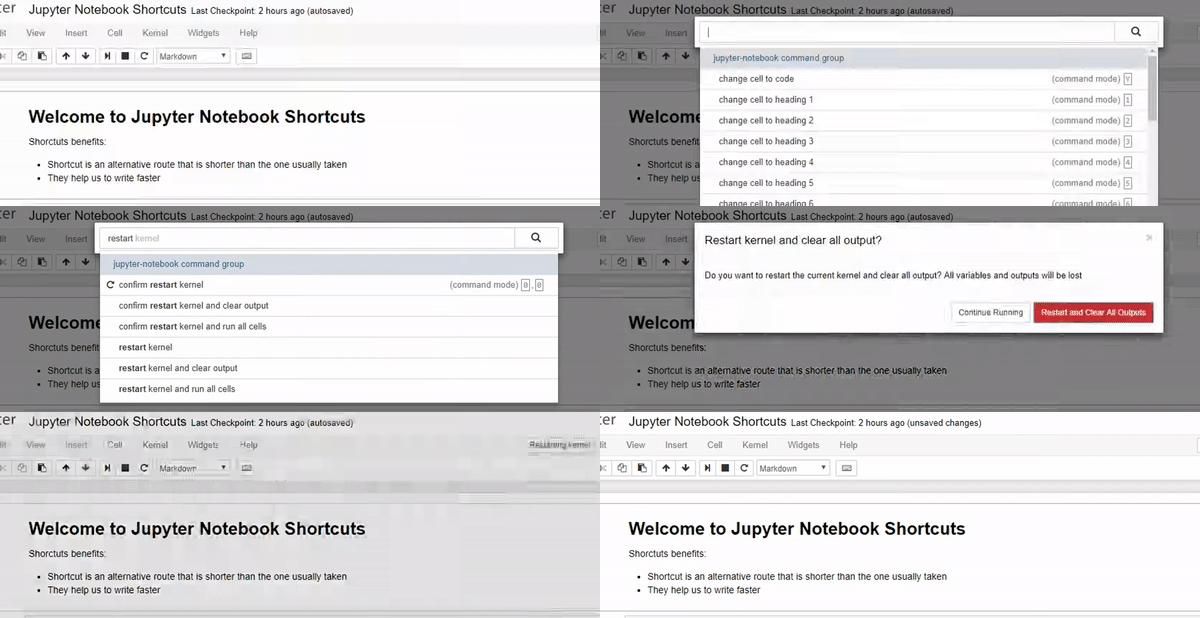
Command Palette
  • Shift + Space scroll notebook up
  • Space scroll notebook down

While in edit mode (pressEnter to activate)

  • Esc take you into command mode
  • Tab code completion or indent
  • Shift + Tab tooltip
  • Ctrl + ] indent
  • Ctrl + [ dedent
  • Ctrl + A select all
  • Ctrl + Z undo
  • Ctrl + Shift + Z or Ctrl + Y redo
  • Ctrl + Home go to cell start
  • Ctrl + End go to cell end
  • Ctrl + Left go one word left
  • Ctrl + Right go one word right
  • Ctrl + Shift + P open the command palette
  • Down move cursor down
  • Up move cursor up

These are the shortcuts I use in my daily work. If you still need something that is not mentioned here you can find it in the keyboard shortcuts dialog (H). You can also edit existing or add more shortcuts from the Help > Edit Keyboard Shortcuts link in the menu bar. Clicking the link will open a dialog. At the bottom of it there are rules for adding or editing shortcuts. You need to use hyphens - to represent keys that should be pressed at the same time.

Source: Ventsislav Yordanov
Via: Towards Data Science
Tags: Jupyter Notebook Shortcuts that you must know!
ShareTweet

Get real time update about this post categories directly on your device, subscribe now.

Unsubscribe

Search

No Result
View All Result

Recent News

Absa and Visa Extend Strategic Partnership to Advance Growth and Innovation Across Africa

Absa and Visa Extend Strategic Partnership to Advance Growth and Innovation Across Africa

July 29, 2025
French Telco Orange Hit by Cyber-Attack

French Telco Orange Hit by Cyber-Attack

July 29, 2025
ATC Ghana supports Girls-In-ICT Program

ATC Ghana supports Girls-In-ICT Program

April 25, 2023

About What We Do

itechnewsonline.com

We bring you the best Premium Tech News.

Recent News With Image

Absa and Visa Extend Strategic Partnership to Advance Growth and Innovation Across Africa

Absa and Visa Extend Strategic Partnership to Advance Growth and Innovation Across Africa

July 29, 2025
French Telco Orange Hit by Cyber-Attack

French Telco Orange Hit by Cyber-Attack

July 29, 2025

Recent News

  • Absa and Visa Extend Strategic Partnership to Advance Growth and Innovation Across Africa July 29, 2025
  • French Telco Orange Hit by Cyber-Attack July 29, 2025
  • ATC Ghana supports Girls-In-ICT Program April 25, 2023
  • Vice President Dr. Bawumia inaugurates ICT Hub April 2, 2023
  • Home
  • InfoSec
  • Opinion
  • Africa Tech
  • Data Storage

© Copyright 2026, All Rights Reserved | iTechNewsOnline.Com - Powered by BackUPDataSystems

Welcome Back!

Login to your account below

Forgotten Password?

Retrieve your password

Please enter your username or email address to reset your password.

Log In

Add New Playlist

No Result
View All Result
  • Home
  • Tech
  • Africa Tech
  • InfoSEC
  • Data Science
  • Data Storage
  • Business
  • Opinion

© Copyright 2026, All Rights Reserved | iTechNewsOnline.Com - Powered by BackUPDataSystems

Are you sure want to unlock this post?
Unlock left : 0
Are you sure want to cancel subscription?
Go to mobile version