
• Latest
  • Trending
Creating Various Filters With OpenCV/Python

Creating Various Filters With OpenCV/Python

May 6, 2022
Absa and Visa Extend Strategic Partnership to Advance Growth and Innovation Across Africa

Absa and Visa Extend Strategic Partnership to Advance Growth and Innovation Across Africa

July 29, 2025
French Telco Orange Hit by Cyber-Attack

French Telco Orange Hit by Cyber-Attack

July 29, 2025
ATC Ghana supports Girls-In-ICT Program

ATC Ghana supports Girls-In-ICT Program

April 25, 2023
Vice President Dr. Bawumia inaugurates  ICT Hub

Vice President Dr. Bawumia inaugurates ICT Hub

April 2, 2023
Co-Creation Hub’s edtech accelerator puts $15M towards African startups

Co-Creation Hub’s edtech accelerator puts $15M towards African startups

February 20, 2023
Data Leak Hits Thousands of NHS Workers

Data Leak Hits Thousands of NHS Workers

February 20, 2023
EU Cybersecurity Agency Warns Against Chinese APTs

EU Cybersecurity Agency Warns Against Chinese APTs

February 20, 2023
How Your Storage System Will Still Be Viable in 5 Years’ Time?

How Your Storage System Will Still Be Viable in 5 Years’ Time?

February 20, 2023
The Broken Promises From Cybersecurity Vendors

Cloud Infrastructure Used By WIP26 For Espionage Attacks on Telcos

February 20, 2023
Instagram and Facebook to get paid-for verification

Instagram and Facebook to get paid-for verification

February 20, 2023
YouTube CEO Susan Wojcicki steps down after nine years

YouTube CEO Susan Wojcicki steps down after nine years

February 20, 2023
Inaugural AfCFTA Conference on Women and Youth in Trade

Inaugural AfCFTA Conference on Women and Youth in Trade

September 6, 2022
  • Consumer Watch
  • Kids Page
  • Directory
  • Events
  • Reviews
Thursday, 16 July, 2026
  • Login
itechnewsonline.com
  • Home
  • Tech
  • Africa Tech
  • InfoSEC
  • Data Science
  • Data Storage
  • Business
  • Opinion
Subscription
Advertise
No Result
View All Result
itechnewsonline.com
No Result
View All Result

Creating Various Filters With OpenCV/Python

by ITECHNEWS
May 6, 2022
in Data Science, Leading Stories
0 0
0
Creating Various Filters With OpenCV/Python

Introduction

Hello! I recently decided to add more filters to my previous cartoon filter example which can be found here:

https://dev.to/ethand91/cartoon-filter-using-opencv-and-python-3nj5

YOU MAY ALSO LIKE

French Telco Orange Hit by Cyber-Attack

ATC Ghana supports Girls-In-ICT Program

This post continues from the above post so I won’t be going over creating the virtual environment etc.

Well then lets add some more cool filters! 😎


HDR Filter

The HDR effect filter is simple to implement we just use the detailEnhance method:

def HD (image):
  hdrImage = cv2.detailEnhance(image, sigma_s = 12, sigma_r = 0.15)

  return hdrImage

sigma_s controls how much the image is smoothed and sigma_r is important to preserve edges while smoothing the image.
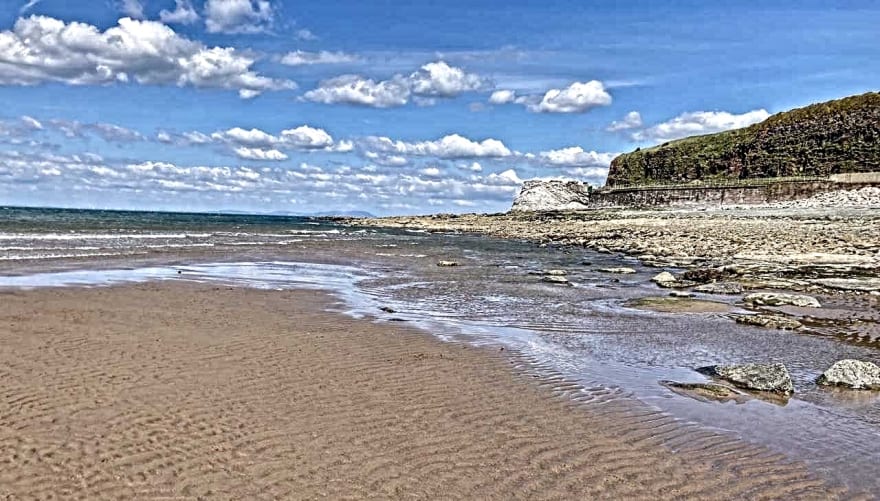
HDR Filter


Pencil Sketch GreyScale/Color Filter

This is another easy to implement filter as opencv already has a method that can do this for us.
This method returns both the greyscale image and the color image, here I am returning the color version but feel free to try out the greyscale image too.

def pencil (image):
  sk_gray, skColor = cv2.pencilSketch(image, sigma_s = 60, sigma_r = 0.07, shade_factor = 0.1)

  return skColor
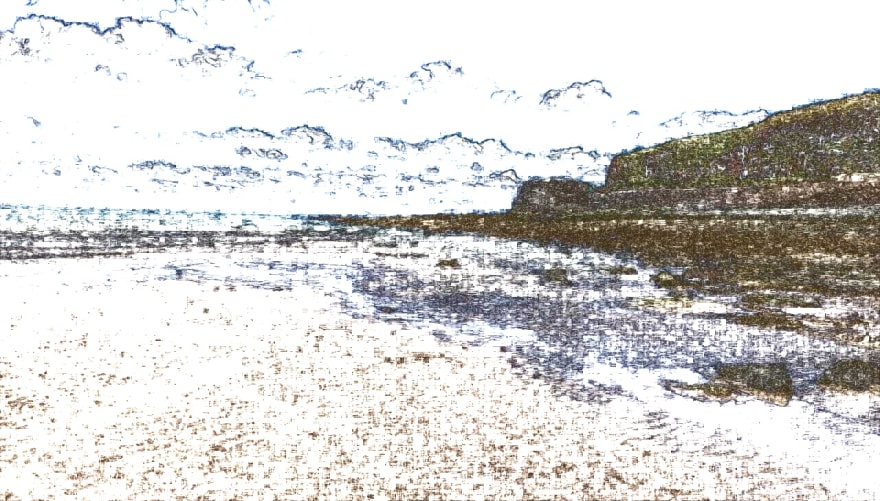
Pencil Filter


Sepia Filter

The sepia filter lets us apply a brown, calm effect to images.
To do this we convert to float to prevent loss, transform the image and then finally normalizing the values.

def sepia (image):
  # Convert to float to prevent loss
  sepiaImage = np.array(image, dtype = np.float64)
  sepiaImage = cv2.transform(sepiaImage, np.matrix([[0.272, 0.543, 0.131], [0.349, 0.686, 0.168], [0.393, 0.769, 0.189]]))
  sepiaImage[np.where(sepiaImage > 255)] = 255
  sepiaImage = np.array(sepiaImage, dtype = np.uint8)

  return sepiaImage

Sepia Filter


Sharpen Filter

To sharpen the image we will use the filter2D method and apply the following kernel.

def sharpen (image):
  kernel = np.array([[-1, -1, -1], [-1, 9.5, -1], [-1, -1, -1]])
  sharpenedImage = cv2.filter2D(image, -1, kernel)

  return sharpenedImage
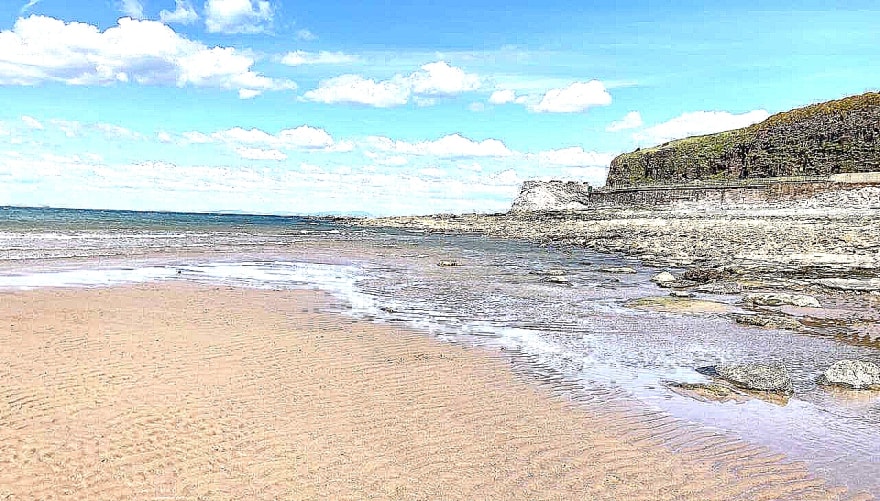
Sharpen Filter


Brightness Filter

To adjust the image’s brightness we will use the convertScaleAbs method.

def brightness (image, betaValue):
  brightImage = cv2.convertScaleAbs(image, beta = betaValue)

  return brightImage

Brightness Filter

We can also use this filter to make the image darker by passing a negative value to beta.

Darkness Filter


Greyscale Filter

Greyscale filter is another easy filter to implement wi just use the cvtColor method.

def grayScale (image):
  grayImage = cv2.cvtColor(image, cv2.COLOR_BGR2GRAY)

  return grayImage

Greyscale Filter


Invert Filter

Another easy filter to implement we just invert the pixel values using the bitwise_not method.

def invert (image):
  invertedImage = cv2.bitwise_not(image)

  return invertedImage 

Inverted Filter


Saving the images

Once we have all the filtering methods defined it would be a shame not to use them.
Edit the main method to include the following:

cartoonImage = cartoonize(image)
invertedImage = invert(image)
grayImage = grayScale(image)
brightImage = brightness(image, 60)
darkerImage = brightness(image, -60)
sharperImage = sharpen(image) 
sepiaImage = sepia(image)
pencilImage = pencil(image)
hdrImage = HD(image)

Finally we can write the output to file with the following, append them to the main method:

cv2.imwrite("output.jpg", cartoonImage)
cv2.imwrite("inverted.jpg", invertedImage)
cv2.imwrite("grayscale.jpg", grayImage);
cv2.imwrite("brighter.jpg", brightImage)
cv2.imwrite("darker.jpg", darkerImage)
cv2.imwrite("sharper.jpg", sharperImage)
cv2.imwrite("sepia.jpg", sepiaImage)
cv2.imwrite("pencil.jpg", pencilImage)
cv2.imwrite("hdrImage.jpg", hdrImage)

Done!

Feel free to change the values etc, to see what different effects you can make. 🥳


Conclusion

Here I have shown how to apply various filters to an image, using opencv’s methods it wasn’t too hard to implement.

I will make another post if I manage to find more interesting/fun filters. 🥸

The repo can be found here:
https://github.com/ethand91/opencv-cartoon-filter

Source: Ethan
Via: dev.to
Tags: Creating Various Filters With OpenCV/Python
ShareTweet

Get real time update about this post categories directly on your device, subscribe now.

Unsubscribe

Search

No Result
View All Result

Recent News

Absa and Visa Extend Strategic Partnership to Advance Growth and Innovation Across Africa

Absa and Visa Extend Strategic Partnership to Advance Growth and Innovation Across Africa

July 29, 2025
French Telco Orange Hit by Cyber-Attack

French Telco Orange Hit by Cyber-Attack

July 29, 2025
ATC Ghana supports Girls-In-ICT Program

ATC Ghana supports Girls-In-ICT Program

April 25, 2023

About What We Do

itechnewsonline.com

We bring you the best Premium Tech News.

Recent News With Image

Absa and Visa Extend Strategic Partnership to Advance Growth and Innovation Across Africa

Absa and Visa Extend Strategic Partnership to Advance Growth and Innovation Across Africa

July 29, 2025
French Telco Orange Hit by Cyber-Attack

French Telco Orange Hit by Cyber-Attack

July 29, 2025

Recent News

  • Absa and Visa Extend Strategic Partnership to Advance Growth and Innovation Across Africa July 29, 2025
  • French Telco Orange Hit by Cyber-Attack July 29, 2025
  • ATC Ghana supports Girls-In-ICT Program April 25, 2023
  • Vice President Dr. Bawumia inaugurates ICT Hub April 2, 2023
  • Home
  • InfoSec
  • Opinion
  • Africa Tech
  • Data Storage

© Copyright 2026, All Rights Reserved | iTechNewsOnline.Com - Powered by BackUPDataSystems

Welcome Back!

Login to your account below

Forgotten Password?

Retrieve your password

Please enter your username or email address to reset your password.

Log In

Add New Playlist

No Result
View All Result
  • Home
  • Tech
  • Africa Tech
  • InfoSEC
  • Data Science
  • Data Storage
  • Business
  • Opinion

© Copyright 2026, All Rights Reserved | iTechNewsOnline.Com - Powered by BackUPDataSystems

Are you sure want to unlock this post?
Unlock left : 0
Are you sure want to cancel subscription?
Go to mobile version