





Introduction to SQL
SQL stands for the Structure Query Language. And it is the most popular RDBMS (Relational Database Management System) language used to create, access, and manage databases. It was developed in the year 1970 at IBM. SQL became a standard of the American National Standards Institute (ANSI) in 1986 and the ISO(International Organisation for Standardisation ) in 1987. Initially, it was called SEQUEL which stands for Structured English Query Language, latter it changed into SQL but the pronunciation remained the same. Many RDBMS software like Oracle, MySQL, MS Access, and SQL Server use SQL as their standard query language.
Why SQL?
It is easier to view, add, delete and change data in a database by using simple queries. Apart from this, there are several other reasons why we use queries. Such as, It is helpful to find specific data by using filtering conditions in a short time. It is also helpful to summarise data by reviewing the current data. All the query operations are done using a standard query language, SQL. To maintain and manage data in a database, SQL provides some sub-languages, including several commands. Through which query operations can be done in a database.
* SQL is a case-insensitive language, so we can use both upper case and lower case letters when we write code.*
Sub Languages of SQL
SQL includes 5 types of sub-languages that are DDL, DML, DQL/DRL, DCL, and TCL.
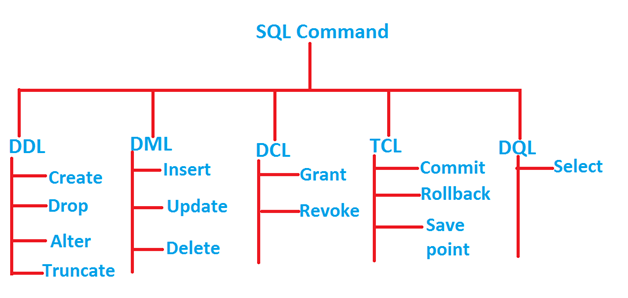
Stands for Data Definition Language, DDL commands are used to change and modify the structure of the table. By default, DDL commands are auto-committed which means when one changes and modifies a table then the values are automatically saved in the database.
Here are the commands of DDL- CREATE, ALTER, DROP, TRUNCATE, RENAME
CREATE- This command is used to create a new table and index in a database.
Syntax: CREATE table table_name (col_1 datatype  size , col_ 2 datatype  size ,...........,col_n datatype  size);
Example: CREATE table Student (Roll_number INTEGER(5), Name VARCHAR(30), Age INTEGER(3),  City VARCHAR(30));
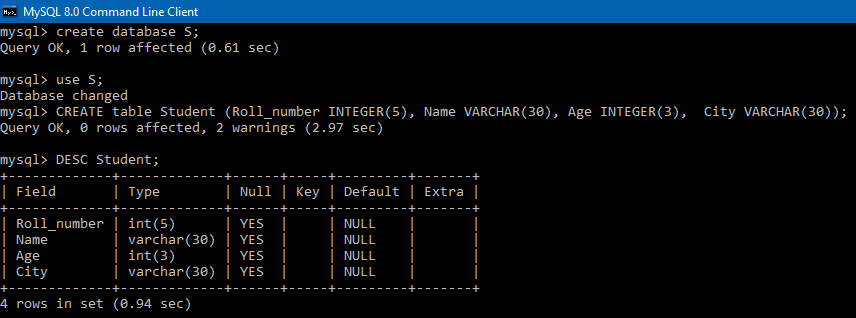
[DESC(DESCRIBE) command is used to retrieve the structure of a table. It may confirm that table is created. ]
ALTER- To change the structure of a table in a database ALTER command is used. We can add a new column in a table and also can change the data type and size of a column.
Syntax: ALTER table table_name ADD column_name COLUMN definition;
               ALTER table table_name MODIFY(column_definition);
Example: ALTER TABLE Student ADD ( Ph_number INTEGER(12));
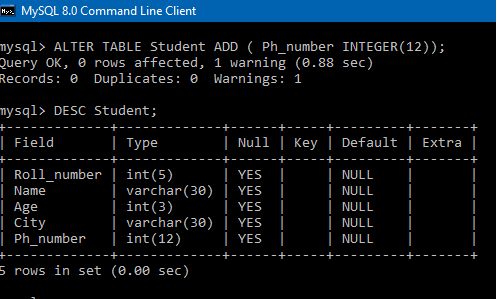
[In the above example we added a new column in the existing table student.]
ALTER TABLE Student MODIFY City VARCHAR(50);
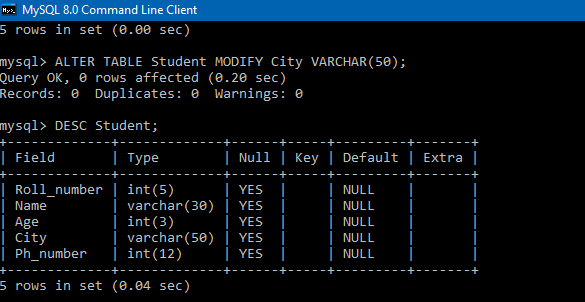
[In the above example we changed the size of the City from 30 to 50.]
RENAME- This command is used to change the name of an existing table in a database. For this purpose, we use ALTER command.
Syntax: ALTER TABLE table_name RENAME  TO new_table_name;
Example: ALTER TABLE  Student  RENAME TO Student_details;
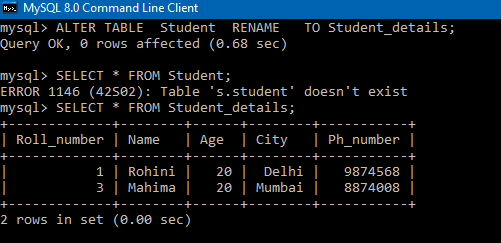
In the above example, we changed the name of the table Student to Student_details. After that when we use the old table name then it displays the message “Table Student doesn’t exist in databases “. In this example, S denotes the name of the database. And when we use the new table name i.e Student_details then it displays all details of the table.
DROP- To remove a table permanently from a database DROP command is used.
Syntax: DROP table table_name;
Example: DROP TABLE Student;
TRUNCATE- This command is used to remove all rows from a table but the table structure remains the same.
Syntax: TRUNCATE table table_name;
Example: TRUNCATE TABLE Student;
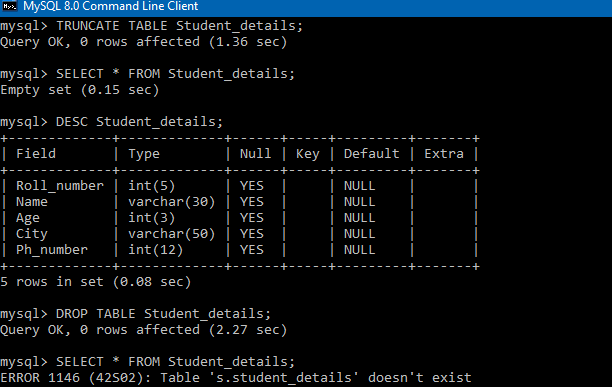
In the above example first, we use the TRUNCATE command which deletes
all rows from the Student_details table. When we try to retrieve the table
details then it shows a message that ‘EMPTY set’.After that, we use the DROP
command which completely deletes the table Student_details from the database.
So when we again try to retrieve table details then it shows a message
‘Student_details’ doesn’t exist in the database.
DML
Stands for Data Manipulation Language. DML commands are used to manage and modify the database. Commands are not auto-committed which means it can’t save the data permanently in a database.
Here are the DML commands- INSERT, UPDATE, DELETE
INSERT– This statement is used to add table row values
Syntax: INSERT INTO table_name(col 1, col 2, col 3,......,col n) VALUES(value 1, value 2, value 3.........., value n);  OR
INSERT INTO table_name VALUES(value 1, value 2, value 3.........., value n);
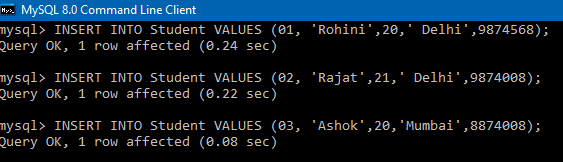
EXAMPLE: INSERT INTO Student VALUES (01, 'Rohini',20,' Delhi');
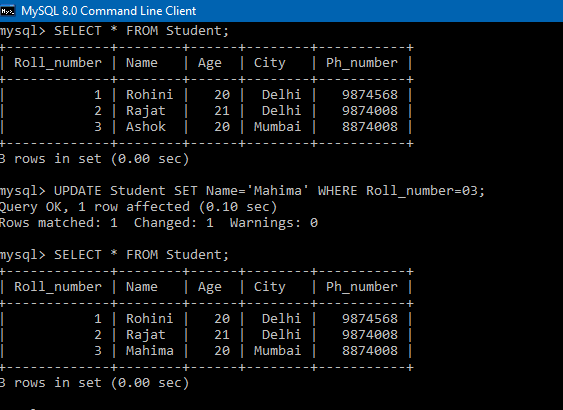
UPDATE- This statement is used to update the values of a column in a table. To update table values WHEREcondition is necessary.
Syntax: UPDATE  table_name SET [column 1= value 1 , column n=value n] WHERE condition;
Example: UPDATE Student SET Name='Mahima' WHERE Roll_number=03;
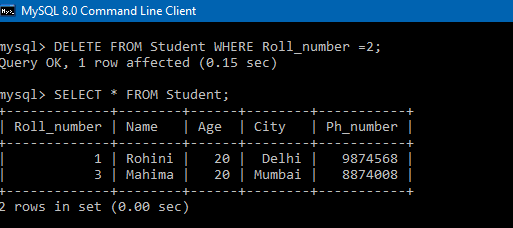
DELETE– To remove a particular row from a table DELETE command is used. WHERE condition is necessary to perform delete operation.
Syntax: DELETE FROM table_name WHERE condition;
Example: DELETE FROM Student WHERE Roll_number =2;
DQL
Stands for Data Query Language. DQL is used to fetch data from the database.
It uses only command i.e SELECT
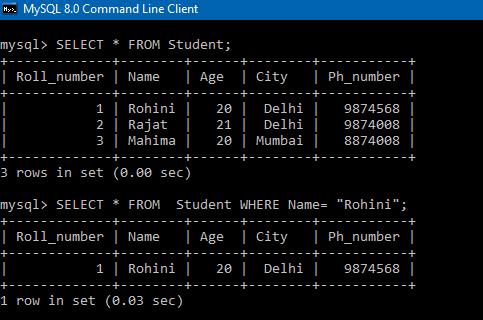
SELECT– This command is used to retrieve table data from the database based on the condition described by the WHERE condition.
Syntax: SELECT * FROM table_name WHERE condition;
SELECT * FROM table_name;
Example: SELECT * FROM Student WHERE Name= “Rohini”;
SELECT * FROM Student;
DCL
Stands for Data Control Language. DCL commands mainly deals with rights, permissions, and other controls of the database. It uses only 2 commands i.e GRANT and revokes.
GRANT– This command is used to GRANT access privileges to the user in the database.
Syntax: GRANT privileges_names ON object_name TO user ;
Example: GRANT ALL ON Salary_detail TO 'Ashish' '@' localhost ;
[By using this command, user Ashish got the permissions to access the Salary_detail table. ]
REVOKE– This command is used to remove access privileges from the user in a database.
Syntax: REVOKE privileges_names ON object_name FROM user_name;
Example: REVOKE All ON  Salary_detail FROM Ashish ;
[By using this command, user Ashish’s permissions on the Salary_detail table have been removed. ]
TCL
Stands for Transaction Control Language. Mainly these TCL commands deal with the transactions in a database. TCL commands are only used with DML commands like INSERT, UPDATE, and DELETE because these commands are not automatically committed in a database.
TCL commands are COMMIT, ROLLBACK, and SAVEPOINT.
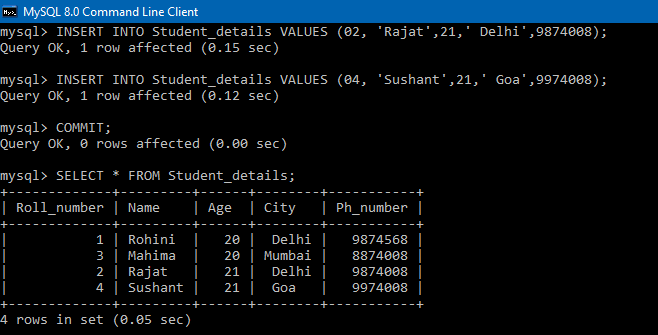
COMMIT – This command is used to save database transactions permanently.
Syntax: COMMIT;
Example: INSERT INTO Student_details VALUES(02,’Rajat’,21,’Delhi’,9874008);
COMMIT;
ROLLBACK- This command is used to remove the recently updated transaction from the database.
Syntax: ROLLBACK;
Example: DELETE FROM Student_details WHERE Roll_number=4;
                ROLLBACK;
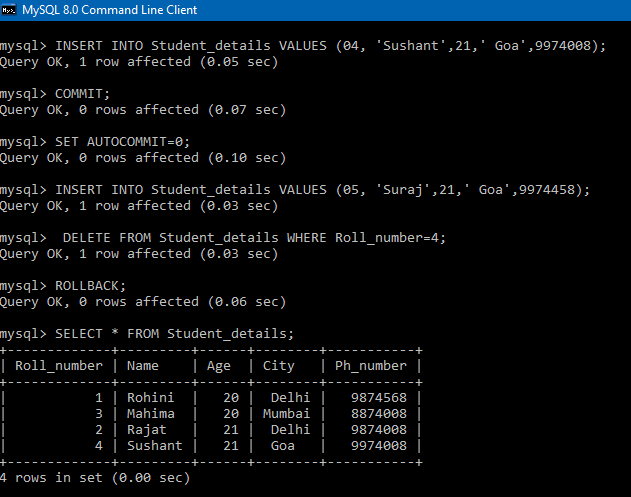
In the above example before using the ROLLBACK command first we have to disable auto-commit by using the command ‘SET AUTOCOMMIT=0’. For the transaction which is already committed ROLLBACK command doesn’t affect that transaction. One can be able to ROLLBACK a transaction if that transaction is not committed.
SAVEPOINT– This command creates a point within the group of transactions. So it helps to roll back the transaction at a certain point without rollback the entire transaction.
Syntax: SAVEPOINT savepoint_name;
              ROLLBACK TO savepoint_name;
Example: SAVEPOINT SP1;
INSERT INTO Student_details VALUES(05,'Suraj',21,'Goa',9974458); ;
    //deleted
    SAVEPOINT SP2;
    //Savepoint created.
    //Rollback completed.
//Savepoint created.
ROLLBACK TO SP1;
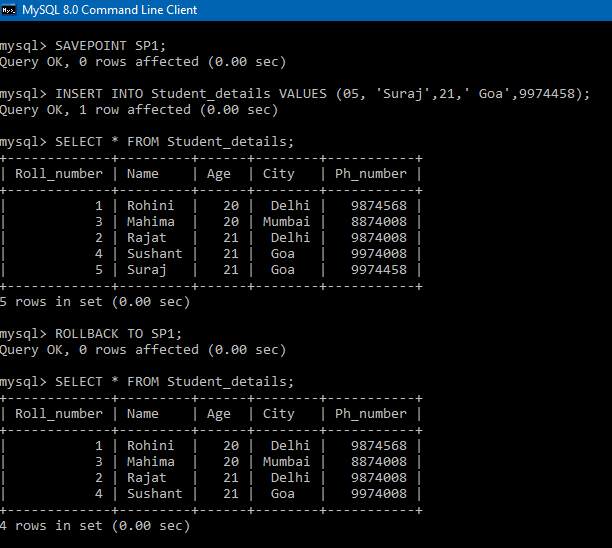
** Before using SAVEPOINT and ROLLBACK in a database, you must confirm
that auto-commit is disabled. Because by default, auto-commit is enabled in database**
Conclusion to SQL
SQL itself is a very vast concept; in this article, we learned about some basic concepts of SQL. The key takeaways from the article are,
- We learned how to define and modify a database and a table by using DDL commands such as CREATE and ALTER and
- Removing a table and table rows by using DROP and TRUNCATE commands.
- Also learned how to insert, update and delete table data by using DML commands such as INSERT, UPDATE and DELETE.
- How to retrieve table values by using the SELECT command.
- Covered commands that control a user’s access to data resources using DCL commands such as GRANT and REVOKE.
- And covered commands that control transactions in a database using TCL commands such as COMMIT, ROLLBACK, and SAVEPOINT.


