


• Latest
  • Trending
From Clipboard to DataFrame with Pandas

From Clipboard to DataFrame with Pandas

March 29, 2022
Absa and Visa Extend Strategic Partnership to Advance Growth and Innovation Across Africa

Absa and Visa Extend Strategic Partnership to Advance Growth and Innovation Across Africa

July 29, 2025
French Telco Orange Hit by Cyber-Attack

French Telco Orange Hit by Cyber-Attack

July 29, 2025
ATC Ghana supports Girls-In-ICT Program

ATC Ghana supports Girls-In-ICT Program

April 25, 2023
Vice President Dr. Bawumia inaugurates  ICT Hub

Vice President Dr. Bawumia inaugurates ICT Hub

April 2, 2023
Co-Creation Hub’s edtech accelerator puts $15M towards African startups

Co-Creation Hub’s edtech accelerator puts $15M towards African startups

February 20, 2023
Data Leak Hits Thousands of NHS Workers

Data Leak Hits Thousands of NHS Workers

February 20, 2023
EU Cybersecurity Agency Warns Against Chinese APTs

EU Cybersecurity Agency Warns Against Chinese APTs

February 20, 2023
How Your Storage System Will Still Be Viable in 5 Years’ Time?

How Your Storage System Will Still Be Viable in 5 Years’ Time?

February 20, 2023
The Broken Promises From Cybersecurity Vendors

Cloud Infrastructure Used By WIP26 For Espionage Attacks on Telcos

February 20, 2023
Instagram and Facebook to get paid-for verification

Instagram and Facebook to get paid-for verification

February 20, 2023
YouTube CEO Susan Wojcicki steps down after nine years

YouTube CEO Susan Wojcicki steps down after nine years

February 20, 2023
Inaugural AfCFTA Conference on Women and Youth in Trade

Inaugural AfCFTA Conference on Women and Youth in Trade

September 6, 2022
  • Consumer Watch
  • Kids Page
  • Directory
  • Events
  • Reviews
Friday, 17 July, 2026
  • Login
itechnewsonline.com
  • Home
  • Tech
  • Africa Tech
  • InfoSEC
  • Data Science
  • Data Storage
  • Business
  • Opinion
Subscription
Advertise
No Result
View All Result
itechnewsonline.com
No Result
View All Result

From Clipboard to DataFrame with Pandas

by ITECHNEWS
March 29, 2022
in Data Science, Leading Stories
0 0
0
From Clipboard to DataFrame with Pandas

YOU MAY ALSO LIKE

French Telco Orange Hit by Cyber-Attack

ATC Ghana supports Girls-In-ICT Program

When I write about a library or a new concept, I typically like to showcase its working via examples. The source of datasets that I use in my articles varies widely. Sometimes I create simple toy datasets, while on other occasions, I go with the established dataset sites like Kaggle and Google search. However, every time I need to showcase a concept, I have to go through the laborious work of copying the data from the source, saving it to my system, and finally using it in my development environment. Imagine my surprise when I discovered a built-in method in pandas created to address this issue. This method, aptly named as read_clipboard is an absolute savior when you want to try out some new function or library quickly, and in this article, we’ll learn how to use it.

Using pandas.read_clipboard() function

The read_clipboard() method of pandas creates a dataframe from data copied to the clipboard. It reads text from the clipboard and passes it to read_csv() which then returns a parsed DataFrame object.

Syntax

pandas.read_clipboard(sep='\\s+', **kwargs)

If you have worked with pandas’ read_csv(), the read_clipboard() method is essentially the same. The only difference is that the source of data in the latter comes from the clipboard buffer instead of a CSV file.

I have you covered incase you want a deep dive into some of the parameters of the read_csv function in pandas.

Usage

Let’s now look at various ways of using this method. The main steps involved are:
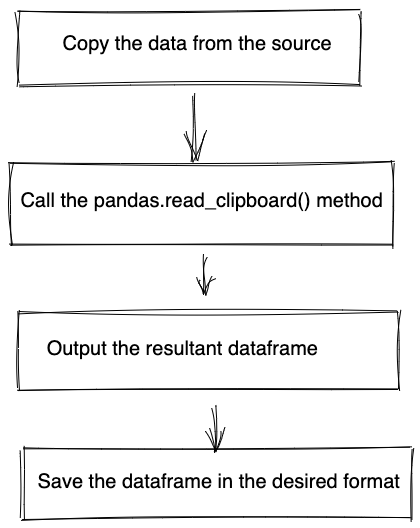
Steps involved | Image by Author

1. Copying data from Excel files

We’ll begin by copying some datasets from an excel file. This is the most common scenario encountered.
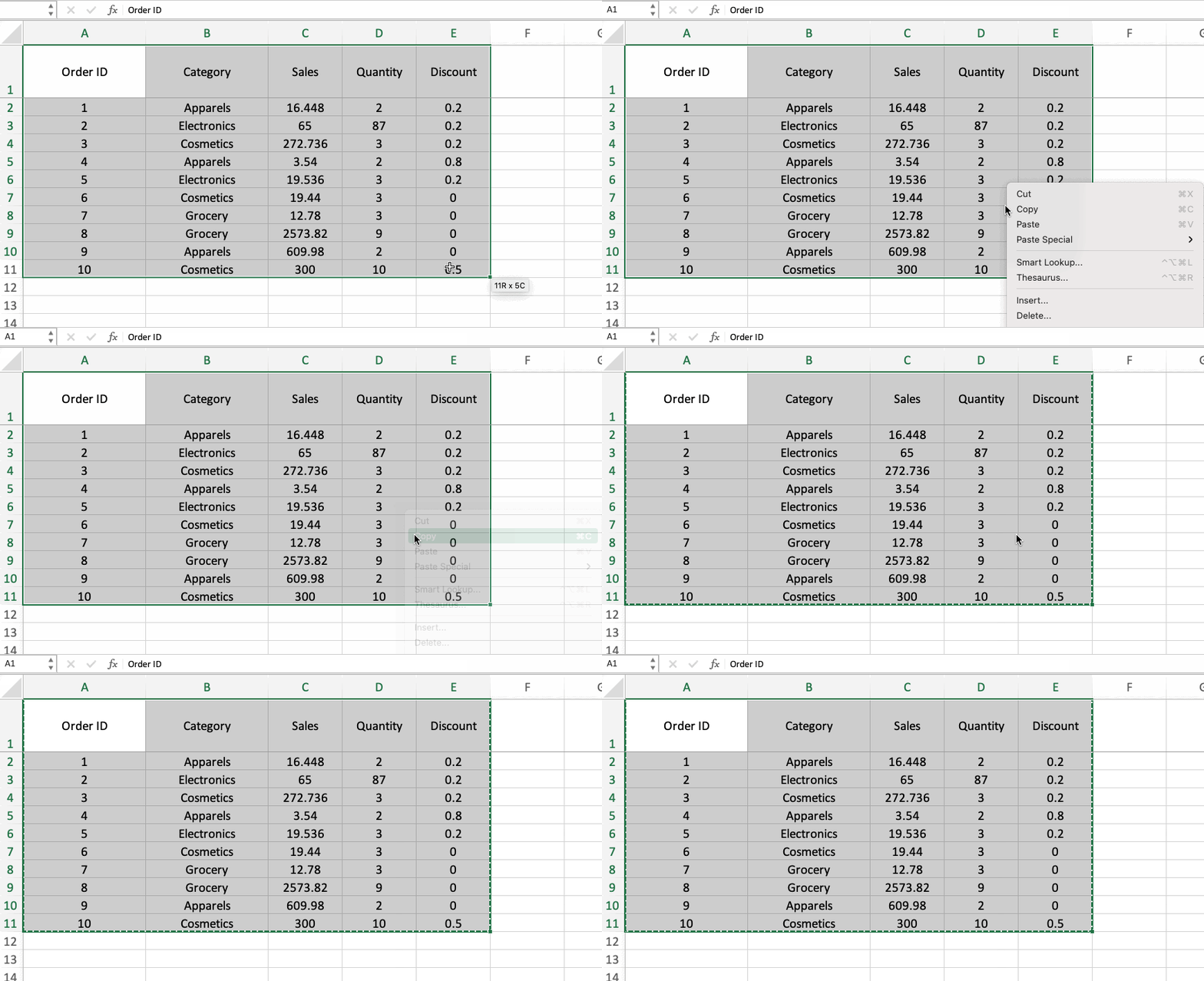
Copying data to clipboard | Image by Author

Now the data has been copied onto the clipboard. Next, we will navigate to a Jupyter Notebook(or any IDE) instance and type in the following code snippet:

import pandas as pd
df = pd.read_clipboard()
df
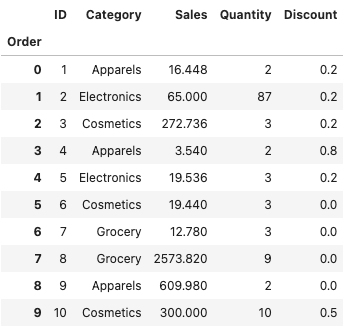
Dataframe obtained from the copied dataset | Image by Author

The copied dataset gets passed into the variable df and is now available in your environment. Below is a GIF that demonstrates the process clearly.

Working of pandas_read_clipboard() method | Image by Author

2. Copying data from CSV files

In case you have a CSV file, the steps remain the same. You will only need to make certain changes in the parameters of the function. Consider the following CSV data:

,Order ID,Category,Sales,Quantity,Discount
0,1,Apparels,16.448,2,0.2
1,2,Electronics,65.0,87,0.2
2,3,Cosmetics,272.736,3,0.2
3,4,Apparels,3.54,2,0.8
4,5,Electronics,19.536,3,0.2
5,6,Cosmetics,19.44,3,0.0
6,7,Grocery,12.78,3,0.0
7,8,Grocery,2573.82,9,0.0
8,9,Apparels,609.98,2,0.0
9,10,Cosmetics,300.0,10,0.5

Copy the above data and run the code below.

df = pd.read_clipboard(
    sep=",",
    header="infer",
    index_col=0,
    names=["Order", "ID", "Category", "Sales", "Quantity", "Discount"],
)df

Dataframe obtained from the copied dataset | Image by Author

We get the same dataframe as in Step 1. We just had to pass in the name of the columns and information about the header and index column.

3. Copying data from Webpages

You can also copy the data from any source, including a web page, as long as it is structured in the form of a dataframe. Here is an example of copying data from a StackOverflow example and importing it into a dataframe.
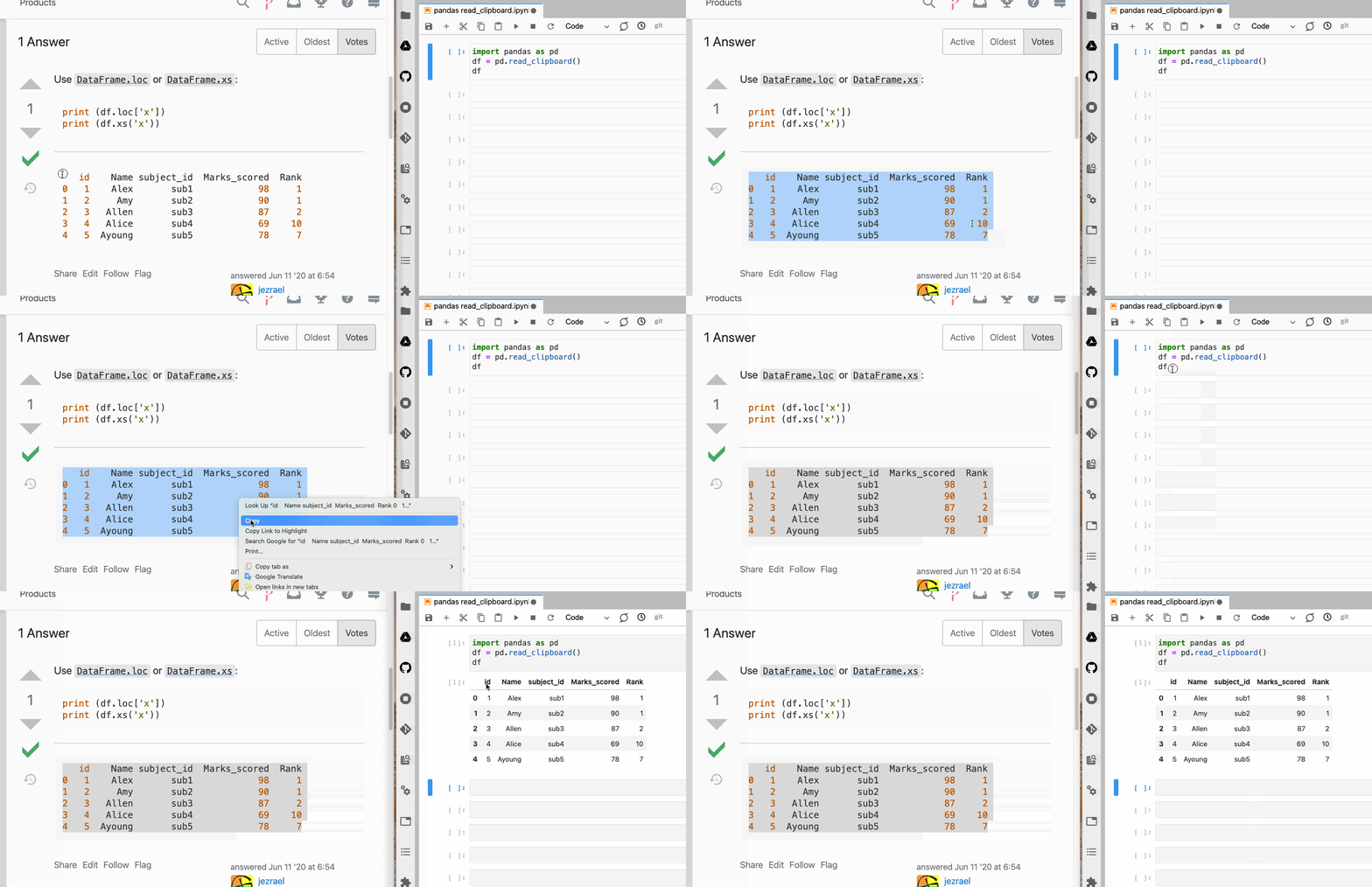
Copying dataframe from a webpage | Image by Author

Saving data

We can use the clipboard data to save the dataset for future use in the desired format.

df.to_csv('data.csv')

You can also save the data in HTML format to display the data as HTML tables.

df.to_html('data.html')
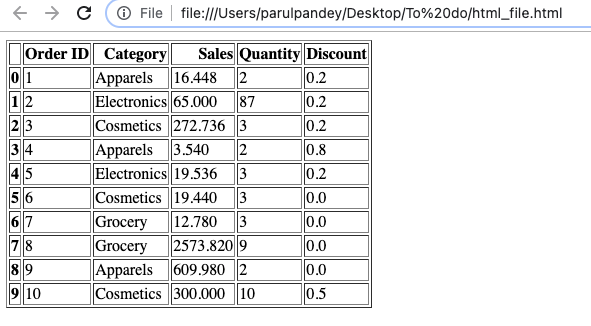
Pandas dataframe saved as an HTML table | Image by Author

Conclusion

Now that you’ve learned about the read_clipboard method, you’ll definitely want to try it out. I’m sure if you like creating data-related tutorials, this will come in handy. You can also check out other blogs that I have written on pandas’ functionality. For instance, this one helps you create interactive plots directly with pandas, and this one is a hands-on guide to ‘sorting’ dataframes in Pandas.

Source: Parul Pandey
Via: opendatascience
Tags: From Clipboard to DataFrame with Pandas
ShareTweet

Get real time update about this post categories directly on your device, subscribe now.

Unsubscribe

Search

No Result
View All Result

Recent News

Absa and Visa Extend Strategic Partnership to Advance Growth and Innovation Across Africa

Absa and Visa Extend Strategic Partnership to Advance Growth and Innovation Across Africa

July 29, 2025
French Telco Orange Hit by Cyber-Attack

French Telco Orange Hit by Cyber-Attack

July 29, 2025
ATC Ghana supports Girls-In-ICT Program

ATC Ghana supports Girls-In-ICT Program

April 25, 2023

About What We Do

itechnewsonline.com

We bring you the best Premium Tech News.

Recent News With Image

Absa and Visa Extend Strategic Partnership to Advance Growth and Innovation Across Africa

Absa and Visa Extend Strategic Partnership to Advance Growth and Innovation Across Africa

July 29, 2025
French Telco Orange Hit by Cyber-Attack

French Telco Orange Hit by Cyber-Attack

July 29, 2025

Recent News

  • Absa and Visa Extend Strategic Partnership to Advance Growth and Innovation Across Africa July 29, 2025
  • French Telco Orange Hit by Cyber-Attack July 29, 2025
  • ATC Ghana supports Girls-In-ICT Program April 25, 2023
  • Vice President Dr. Bawumia inaugurates ICT Hub April 2, 2023
  • Home
  • InfoSec
  • Opinion
  • Africa Tech
  • Data Storage

© Copyright 2026, All Rights Reserved | iTechNewsOnline.Com - Powered by BackUPDataSystems

Welcome Back!

Login to your account below

Forgotten Password?

Retrieve your password

Please enter your username or email address to reset your password.

Log In

Add New Playlist

No Result
View All Result
  • Home
  • Tech
  • Africa Tech
  • InfoSEC
  • Data Science
  • Data Storage
  • Business
  • Opinion

© Copyright 2026, All Rights Reserved | iTechNewsOnline.Com - Powered by BackUPDataSystems

Are you sure want to unlock this post?
Unlock left : 0
Are you sure want to cancel subscription?
Go to mobile version