





As a beginner, you might only know a single way to load data (normally in CSV) which is to read it using pandas.read_csv function. It is one of the most mature and strong functions, but other ways are a lot helpful and will definitely come in handy sometimes.
The ways that I am going to discuss are:
- Manual function
- loadtxt function
- genfromtxt function
- read_csv function
- Pickle
The dataset that we are going to use to load data can be found here. It is named as 100-Sales-Records.
Imports
We will use Numpy, Pandas, and Pickle packages so import them.
import numpy as np
import pandas as pd
import pickle
1. Manual Function
This is the most difficult, as you have to design a custom function, which can load data for you. You have to deal with Python’s normal filing concepts and using that you have to read a .csv file.
Let’s do that on 100 Sales Records file.
def load_csv(filepath):
    data =  []
    col = []
    checkcol = False
    with open(filepath) as f:
        for val in f.readlines():
            val = val.replace("\n","")
            val = val.split(',')
            if checkcol is False:
                col = val
                checkcol = True
            else:
                data.append(val)
    df = pd.DataFrame(data=data, columns=col)
    return df
Hmmm, What is this????? Seems a bit complex code!!!! Let’s break it step by step so you know what is happening and you can apply similar logic to read a .csv file of your own.
Here, I have created a load_csv a function that takes in as an argument the path of the file you want to read.
I have a list named as data which is going to have my data of CSV file, and another list col which is going to have my column names. Now after inspecting the csv manually, I know that my column names are in the first row, so in my first iteration, I have to store the data of the first row in col and rest rows in data.
To check the first iteration, I have used a Boolean Variable named as checkcol which is False, and when it is false in the first iteration, it stores the data of first-line in col and then it sets checkcol to True, so we will deal with data list and store rest of values in data list.
Logic
The main logic here is that I have iterated in the file, using readlines() a function in Python. This function returns a list that contains all the lines inside a file.
When reading through headlines, it detects a new line as \n character, which is line terminating character, so in order to remove it, I have used str.replace function.
As it is a .csv file, so I have to separate things based on commas so I will split the string on a , using string.split(‘,’). For the first iteration, I will store the first row, which contains the column names in a list known as col. And then I will append all my data in my list known as data.
To read the data more beautifully, I have returned it as a dataframe format because it is easier to read a dataframe as compared to a numpy array or python’s list.
Output
myData = load_csv('100 Sales Record.csv')
print(myData.head())

Data from Custom Function.
Pros and Cons
The important benefit is that you have all the flexibility and control over the file structure and you can read in whatever format and way you want and store it.
You can also read the files which do not have a standard structure using your own logic.
Important drawbacks of it are that it is complex to write especially for standard types of files because they can easily be read. You have to hard code the logic which requires trial and error.
You should only use it when the file is not in a standard format or you want flexibility and reading the file in a way that is not available through libraries.
2. Numpy.loadtxt function
This is a built-in function in Numpy, a famous numerical library in Python. It is a really simple function to load the data. It is very useful for reading data which is of the same datatype.
When data is more complex, it is hard to read using this function, but when files are easy and simple, this function is really powerful.
To get the data of a single type, you can download this dummy dataset. Let’s jump to code.
df = np.loadtxt('convertcsv.csv', delimeter = ',')Here we simply used the loadtxt function as passed in delimeter as ‘,’ because this is a CSV file.
Now if we print df, we will see our data in pretty decent numpy arrays that are ready to use.
print(df[:5,:])
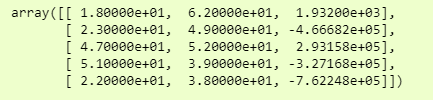
We have just printed the first 5 rows due to the big size of data.
Pros and Cons
An important aspect of using this function is that you can quickly load in data from a file into numpy arrays.
Drawbacks of it are that you can not have different data types or missing rows in your data.
3. Numpy.genfromtxt()
We will use the dataset, which is ‘100 Sales Records.csv’ which we used in our first example to demonstrate that we can have multiple data types in it.
Let’s jump to code.
data = np.genfromtxt('100 Sales Records.csv', delimiter=',')and to see it more clearly, we can just see it in a dataframe format, i.e.,
>>> pd.DataFrame(data)
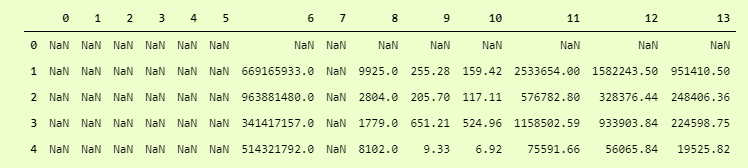
Wait? What is this? Oh, It has skipped all the columns with string data types. How to deal with it?
Just add another dtype parameter and set dtype to None which means that it has to take care of datatypes of each column itself. Not to convert whole data to single dtype.
data = np.genfromtxt('100 Sales Records.csv', delimiter=',', dtype=None)And then for output:
>>> pd.DataFrame(data).head()
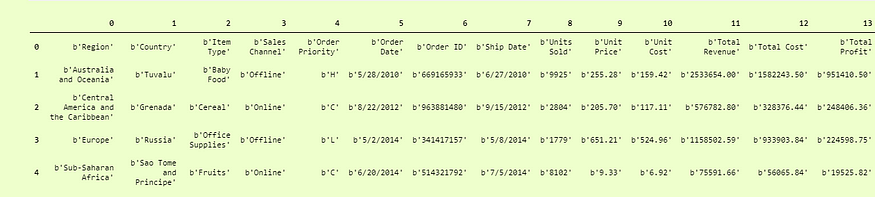
Quite better than the first one, but here our Columns titles are Rows, to make them column titles, we have to add another parameter which is names and set it to True so it will take the first row as the Column Titles.
i.e.
data = np.genfromtxt('100 Sales Records.csv', delimiter=',', dtype=None, names = True)and we can print it as:
>>> pd.DataFrame(df3).head()
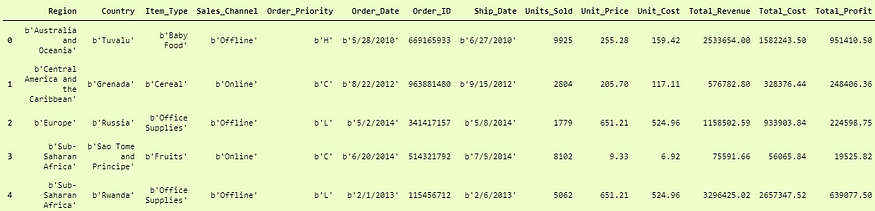
And here we can see that It has successfully added the names of columns in the dataframe.
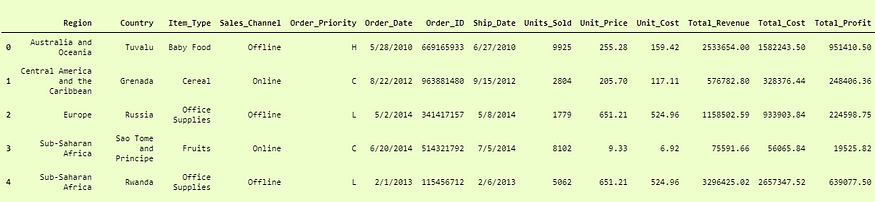
Now the last problem is that the columns which are of string data types are not the actual strings, but they are in bytes format. You can see that before every string, we have a b’ so to encounter them, we have to decode them in utf-8 format.
df3 = np.genfromtxt('100 Sales Records.csv', delimiter=',', dtype=None, names=True, encoding='utf-8')This will return our dataframe in the desired form.
>>> pd.DataFrame(df3)
4. Pandas.read_csv()
Pandas is a very popular data manipulation library, and it is very commonly used. One of it’s very important and mature functions is read_csv() which can read any .csv file very easily and help us manipulate it. Let’s do it on our 100-Sales-Record dataset.
This function is very popular due to its ease of use. You can compare it with our previous codes, and you can check it.
>>> pdDf = pd.read_csv('100 Sales Record.csv')
>>> pdDf.head()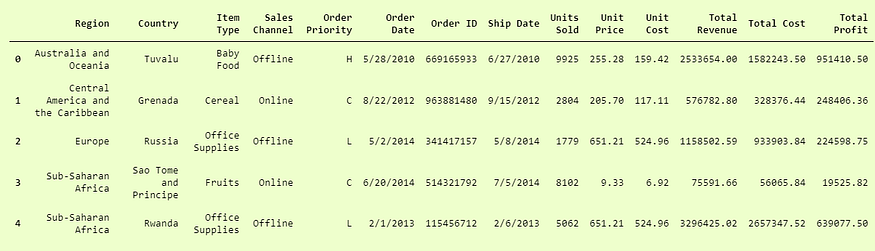
And guess what? We are done. This was actually so simple and easy to use. Pandas.read_csv definitely offers a lot of other parameters to tune in our data set, for example in our convertcsv.csv file, we had no column names so we can read it as:
>>> newdf = pd.read_csv('convertcsv.csv', header=None)
>>> newdf.head()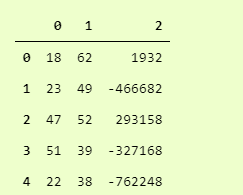
And we can see that it has read the csv file without the header. You can explore all other parameters in the official docs here.
5. Pickle
When your data is not in a good, human-readable format, you can use pickle to save it in a binary format. Then you can easily reload it using the pickle library.
We will take our 100-Sales-Record CSV file and first save it in a pickle format so we can read it.
with open('test.pkl','wb') as f:
    pickle.dump(pdDf, f)
This will create a new file test.pkl which has inside it our pdDf from Pandas heading.
Now to open it using pickle, we just have to use pickle.load function.
with open("test.pkl", "rb") as f:
    d4 = pickle.load(f)

>>> d4.head()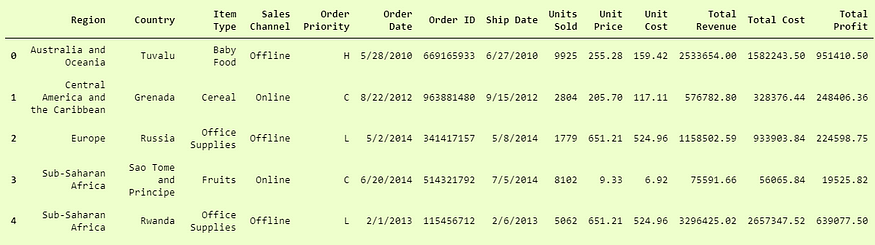
And here we have successfully loaded data from a pickle file in pandas.DataFrame format.
You are now aware of 5 different ways to load data files in Python, which can help you in different ways to load a data set when you are working in your day-to-day projects.


