

What is Virtualenvwrapper
It is a library containing extensions that support management of Python virtual environments and the workflow of development using these environments. Virtualenvwrapper enables Python developers manage multiple virtual environments, create, copy and delete these environments among other functionalities illustrated here.
Python Virtual Environments
There are many third-party Python libraries that are used by developers to achieve tasks and improve functionality of their software. Third-party libraries are simply code written by someone else rather than you and has probably been published to address a given problem and while developing you may require to leverage the functionality of that library. Also, these libraries are not part of the Python’s Standard Library. Therefore, anyone who writes more than just a few lines of code or single script will more often than not find themselves making use of one or more of these libraries.
Installing Virtualenvwrapper

Virtualenvwrapper can be installed in some few steps that are illustrated in this section. The first step is to ensure that you have Python installed in your machine. If not, refer to these posts:
*Installing Python on Linux
*Installing Python on Windows
Also, you require to have pip, the Python’s package index installed and likewise, if you do not have it, refer to this post:
Linux
The official documentation recommends that virtualenvwrapper be installed in the same global-site packages as the virtualenv.
Log into your Linux machine and on the terminal install Virtualenvrapper using pip.
pip install virtualenvwrapper
To install it for your user only use the following command with –user statement to tell pip to install it for current user only.
pip install --user virtualenvwrapper
To confirm successful installation, one can use the whereis command to search the location of the virtualenvwrapper executable shell script that is usually installed with the library.
whereis virtualenvwrapper.sh
which should print out the location of virtualenvwrapper as shown below.

For the local user installation with the additional --user command, the output will appear as shown below.
To execute/run virtualenvwrapper, run the shell script that has been shown in the search.
source /usr/local/bin/virtualenvwrapper.sh
and depending on your installation the following error message may appear.
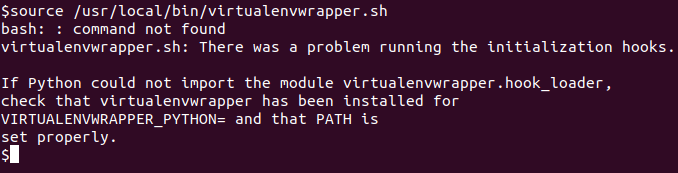
which simply complains that it cannot get the value for the VIRTUALENVWRAPPER_PYTHON variable and therefore as a quick fix, we have to set this in the terminal.
Check Python path using:
which python3
and copy the output of the above command as the value as shown below
VIRTUALENVWRAPPER_PYTHON=/usr/bin/python3
hen re-run the source command
source /usr/local/bin/virtualenvwrapper.sh
which creates the virtual environment management command scripts as shown below. Note that your path may be different.
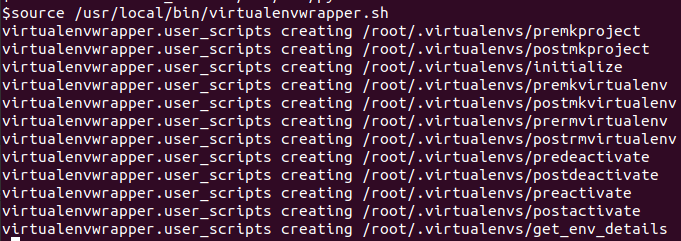
The virtualenvwrapper has successfully been set up for use.
Windows
There is a different library for virtualenvwrapper called virtualenvwrapper-win. Assuming that you already have installed Python in Windows, proceed with opening the Windows terminal or command prompt and install the package using pip.
pip install virtualenvwrapper-win
After installing, one can confirm installation using the pip list command which in this case shows the library/package and its dependencies that have been installed.
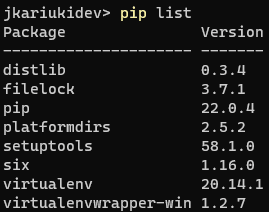
The virtualenvwrapper-win package has been successfully installed.
Common virtualenvwrapper commands
- workon – Activate/deactivate and switch between multiple virtual environments.
- mkvirtualenv – Create a new virtual environment.
- mktmpenv – Create a temporary virtual environment.
- rmvirtualenv – Remove an existing virtual environment
- mkproject – Project directory management command for creating a new virtual environment in the preset (PROJECT_HOME) directory.
- rmproject – Remove existing project.
- lsvirtualenv – List all the environments.
- deactivate – Deactivate an active virtual environment and switch back to global/system-based Python.
Add Virtualenvwrapper to Startup
1. Linux
After installing virtualenvwrapper successfully via pip, if you try executing any of the commands directly from the CommandPrompt or Powershell you will get an error.
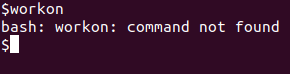
To enable virtualenvwrapper to work on startup, a number a environment variables should be added either to the .bashrc or .profile scripts in the home directory of the user. This is because when system is started or rebooted, the OS begins with these.
- VIRTUALENVWRAPPER_PYTHON – Overrides the $PATH search by setting the variable to the full path of the Python interpreter to use. In this specific case we’ll set it to
/usr/bin/python3 - WORKON_HOME (optional) – This directs virtualenvwrapper on where to place the virtual environments which will be created. If not set it defaults to
.local/share/virtualenvs/. - PROJECT_HOME – This directs virtualenvwrapper on where to place the project working directories. Note that this folder must be existing otherwise an error will be thrown. You can use your preferred editor to append the environment variables to the end of either
.bashrcor.profilefile. This is how the configuration done in .bashrc file appears in vim editor (yours may be different).
After appending, run the script otherwise you may have to re-log in or reboot to pick up the new variables which can be quite a hassle on time.
source ~/.bashrc
And any of the virtualenvwrapper commands can now be executed in the terminal. An illustration is shown below.

Note the brackets on the terminal prompt which indicates that we are in an active Python virtual environment. Now one can proceed with installing packages and developing their software or app.
2. Windows
After installing virtualenvwrapper-win successfully via pip, if you try executing any of the commands directly from the CommandPrompt or Powershell you will get an error.
PowerShell

CommandPrompt

Therefore, we should add the Python package scripts folder onto the Windows environment variables of the current user. The path to the scripts is usually located at C:\Users\<USERNAME>\AppData\Roaming\Python\Python310\Scripts in the case of Python 3.10. Use the following command to add the location to PATH. Remember to replace ‘jkariukidev’ below with your user.
setx PATH "%PATH%;C:\Users\jkariukidev\AppData\Roaming\Python\Python310\Scripts"
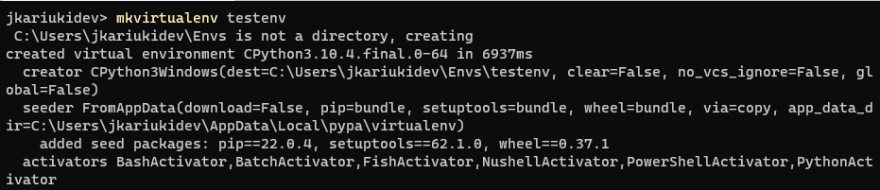
Restart Command Prompt or PowerShell and try to create a new virtual environment using mkvirtualenv command as illustrated below.