

Hello, welcome back to this exciting data structures series. This is a continuation of Built-in Data Structures in python.If you are new to python, I would highly recommend you to read my previous post .
As the name suggest, User-defined data structures are data structures created by user primitively while keeping in mind the built-in data structure.
Additionally they can be classified into :
1. Linear:
a. Stack b. Queue c. Linked List
2. Non-linear:
a. Tree b. Graph c. HashMap
Demo and Explanation
a.Stack
Stacks Store items on the basis of First-In/Last-Out (FILO) or Last-In/First-Out (LIFO). To add and remove item from a stack, you will use push and pop respectively. Other functions related to Stack are empty(), size() and top().
Stacks can be implemented using modules and data structures from the Python library – list, collections.deque, and queue.LifoQueue.

Implementation
As stated earlier , stacks can be implemented in 3 ways, namely
- List
- collections.deque
- queue.LifoQueue
And We shall cover them in the simplest form
Implementing Stack Using list
car_stack = []
car_stack.append('Audi')
car_stack.append('Subaru')
car_stack.append('BMW')
car_stack.append('Chevrolet')
car_stack

Output:
['Audi', 'Subaru', 'BMW', 'Chevrolet']
#note the order of appending.
car_stack.pop()
'Chevrolet'
Note
- Creating stacks using List might be easier due to it’s familiarity, however list has some drawbacks. You will realize, as a list grow, speed will become a challenge.
- Additionally,Inserting item to your stack at a position other than the end, it can take much longer. This is not normally something you would do to a stack, however.
Implementing stacks Using collections.deque
deque is pronounced “deck” and stands for “double-ended queue.”
You can use the same methods on deque as you saw above for list, .append(), and .pop()
from collections import deque

town_stack = deque()
town_stack.append('kilifi')
town_stack.append('mumbai')
town_stack.append('kansas')
town_stack

Output:
deque(['kilifi', 'mumbai', 'kansas'])

town_stack.pop()
Output:
kansas
NOTE
- From the brief explanation on deque, you will realize deque and list serve the same operations. However , you will realize deque and list have a difference in the why they store data.
List store elements in blocks of adjacent memory which might take time to append() a stack especially when the stack is full.
Deque store elements in its own memory block and has a reference to the next entry in the list.This facilitate easy update of nodes
Implementing stacks Using queue.LifoQueue
There are various functions available in this module:
| Method | Description |
|---|---|
| maxsize | Number of items allowed in the queue. |
| empty() | Return True if the queue is empty, False otherwise. |
| full() | Return True if there are maxsize items in the queue. If the queue was initialized with maxsize=0 (the default), then full() never returns True. |
| get() | Remove and return an item from the queue. If the queue is empty, wait until an item is available. |
| get_nowait() | Return an item if one is immediately available, else raise QueueEmpty. |
| put(item) | Put an item into the queue. If the queue is full, wait until a free slot is available before adding the item. |
| put_nowait(item) | Put an item into the queue without blocking. |
| qsize() | Return the number of items in the queue. If no free slot is immediately available, raise QueueFull. |
from queue import LifoQueue

# Initializing a stack
mystack = LifoQueue(maxsize = 6)

# qsize() show the number of elements
# in the stack
print(mystack.qsize())

# put() function to push
# element in the stack
mystack.put('ub40')
mystack.put('Lucky dube')
mystack.put('Charlie Chaplin')
mystack.put('Sinach')
mystack.put('Davido')
mystack.put('Hillsong')

print("Full: ", mystack.full())
print("Size: ", mystack.qsize())

# get() fucntion to pop
# element from stack in
# LIFO order
print('\nElements poped from the stack')
print(mystack.get())
print(mystack.get())
print(mystack.get())

print("\nEmpty: ", mystack.empty())

Output:
0
Full:  True
Size:  6

Elements popped from the stack
Hillsong
Davido
Sinach

Empty:  False
b.Queue
A queue is a useful data structure in programming, so far we have discussed the LIFO operation in stack. For queue it follows FIFO operation(First In First Out or in simple term first come first Served).Therefore , the item that goes in first goes out first.
In programming terms, putting items in the queue is called enqueue, and removing items from the queue is called dequeue.
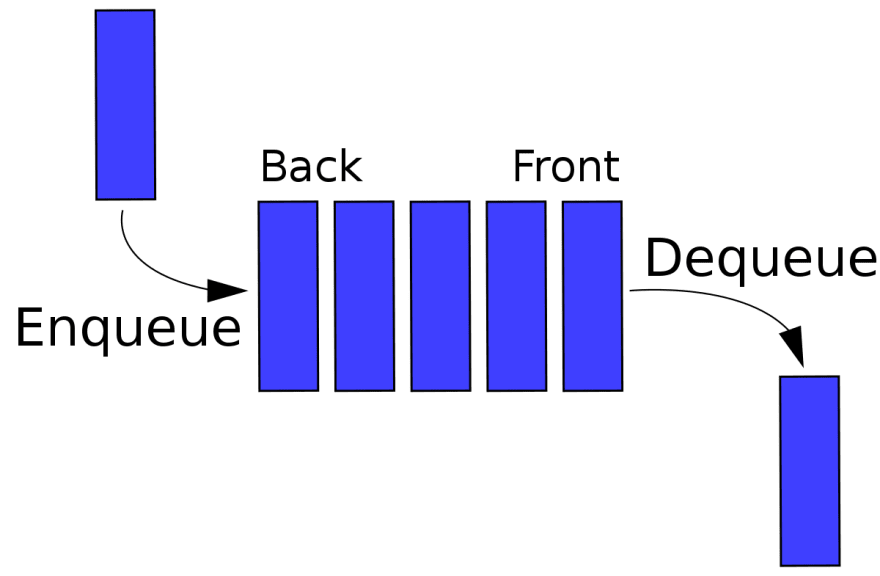
Basic Queue Operations
| Operation | Description |
|---|---|
| Enqueue | Add an element to the end of the queue |
| Dequeue | Remove an element from the front of the queue |
| IsEmpty | Check if the queue is empty |
| IsFull | Check if the queue is full |
| Peek | Get the value of the front of the queue without removing it |
#implementing queue
class Queue:
  def __init__(self):
    self.queue = list()

  #adding elements
  def enqueue(self,item):
    self.queue.append(item)

  #remove item from queue
  def dequeue(self,item):
    if len(self.queue)< 1:
      return None
    return self.queue.pop(0)

  #Display queue
  def display(self):
    print(self.queue)

  #queue size
  def size(self):
    return len(self.queue)

q = Queue()
q.enqueue(18)
q.enqueue(1)
q.enqueue(2)
q.enqueue(3)
q.enqueue(4)
q.enqueue(5)
q.dequeue(0)
q.display()
c. Linked list
A linked list is a sequence of data elements, which are connected together via links. This is implemented using the concept of nodes.Each data element contains a connection to another data element in form of a pointer.Each node contains a value and a pointer to the next node in the chain.
Linked list can be implemented in various form:
- Singly Linked list
- Circularly Linked Lists
- Doubly Linked Lists
However in this post we will majorly look into singly linked list.Which is the simplest and a building block for the rest of the lists.
Terminologies:
- Head:This is the first node of a linked list
- Tail: This is the last node of a linked list and can be identified as having a None value as its next reference.
- link or pointer : It is simply the identifier to the next node
- Traversing(link hopping or pointer hopping): It is the process of moving from the head through each node following each node’s next reference, and finally to the tail of the linked list

Basic Implementation of Linked List
class Node:
    # Creating a node
    def __init__(self, item):
        self.item = item
        self.next = None
class LinkedList:
  def __init__(self):
    self.head = None


if __name__ == '__main__':

    linked_list = LinkedList()
    linked_list.head = Node(1)
    second = Node(2)
    third = Node(3)
    linked_list.head.next = second
    second.next = third
    while linked_list.head != None:
        print(linked_list.head.item, end=" ")
        linked_list.head = linked_list.head.next
In this post , I have basically define the structure and definition of linear data structures.In my upcoming posts I will be going into details especially for linked List.