





in this article, we will learn all about Structured Query Language (SQL) and SQL Commands in depth.
For practicing Structured Query Language (SQL) commands you can either install MySQL workbench using this tutorial or you can refer to any online SQL compiler.
Before Proceeding to this article I assume that you already have some basic idea of the database management systems if not you can read it here.
Table of Contents
- Understanding SQL & RDBMS
- Data Definition Language (DDL)
- Data Manipulation Language (DML)
- Data Query Language (DQL)
- Data Control Language (DCL)
SQL
Structured Query Language (SQL) is an ANSI/ISO standard language for querying and manipulating the data from the database.
however, there are various other query languages like Oracle, PostgreSQL, Apache Aurora, Microsoft Access, and MariaDB and all of these must support the commands (such as SELECT, UPDATE, DELETE, INSERT, WHERE).
Structured Query Language (SQL) is extensively used in data mining, data storage, and OLTP systems.
Structure Query Language (SQL) works on Relational Database, where various tables are interrelated using some primary and foreign keys. The data stored in Relational Database is known as tables and a table contains various columns and rows.

Relational Model Concepts
- Tables: In the Relation model a table holds and structures the data.
- Attribute: Columns of a table can be taken as an attribute.
- Tuple: A single row of a table is known as a tuple.
- Degree: Total numbers of attributes in a table.
- Relation key: In Relational Database a table contains one or more attributes that are used to relate to other tables.
SQL Commands
Before starting Structured Query Language (SQL) programming we first need to understand the basic commands categories for performing various functions i.e. Database Creation, data manipulation and data updating, Query (retrieving the data), and access control.
In SQL we have numerous commands and each command are categorized based on how they are used.
Main Categories of SQL Commands
Data Definition Language(DDL)
It enables us to create, restructure, the tables. DDL is responsible only for the structure of the table, not the data inside it.
The most common DDL commands are DROP, CREATE, ALTER.
Data Manipulation Language (DML)
These types of commands let us manipulate the data inside a table. The most common DML commands are DELETE, INSERT, UPDATE.
Data Query Language (DQL)
These categories of commands are used to select the data from a table. The most common command is SELECT.
Transactional Control Commands (TCL)
TCL commands allow users to manage transactions (changes) to maintain database integrity. You can revert or you can commit changes explicitly in the database and can manage using TCL commands.
the most common TCL commands are ROLLBACK, COMMIT.
Enough Theory !!!
Let’s start working with SQL in details
Open SQL Workbench or an online SQL compiler using this link.
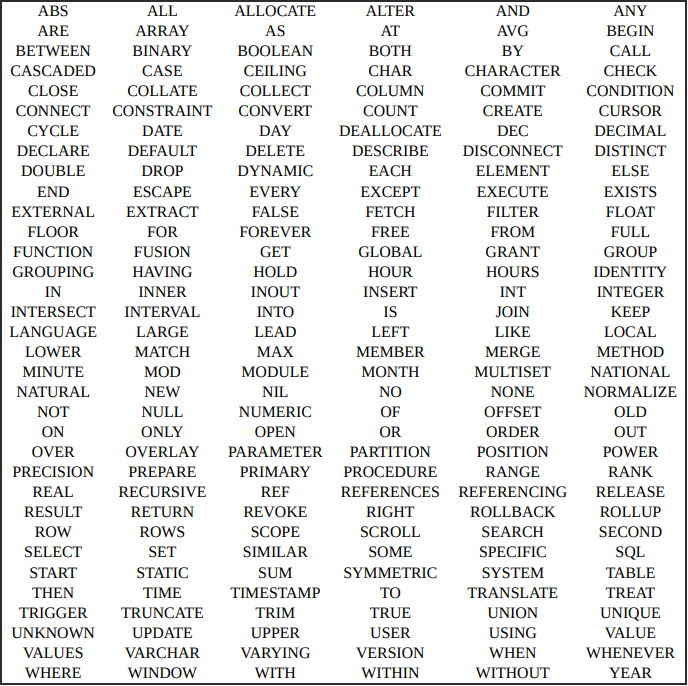
In addition, SQL commands are not case sensitive but it’s a good practice to write commands in the UPPER cases.
SQL Database and Table commands
If you are working with a Database management system having multiple databases you can list all available databases and you can select one of them.
# This List all the available databases
SHOW databases;
# this will select the database in the context
USE DATABASE_NAME
Creating a Database
If you have admin privilege only then you can create, update and delete the database and can list all the available database.
CREATE DATABASE databasename;
# it creates an empty database with no tables at the instance
CREATE
The CREATE TABLE command is used to create a new table in our selected database.
CREATE TABLE table_name (
    column1 datatype constraints,
    column2 datatype constraints,
    column3 datatype constraints,
   ....
);
SQL constraints are the properties of a column in a table. There are some commonly used constraints in SQL —
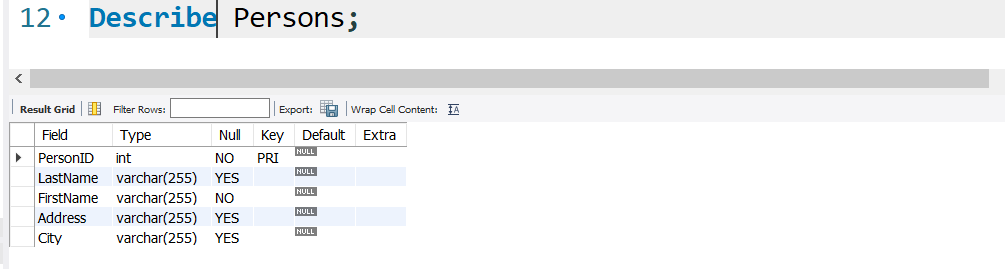
NOT NULL:It ensures that a column can not have any null values.UNIQUE– It ensures that a column can have unique values, duplicate values are not allowed.PRIMARY KEY– Primary keys are used to identify a particular row, Primary keys are non-null and contain unique values.FOREIGN KEY– Foreign Keys are used to link a table to another table having a common column.DEFAULT– A default value can be set, if no value is given in that column default value will be taken- you can see all columns’ names, data types, and constraints of a table using the DESC/DESCRIBEcommand.
DESC Table_name;
DESCRIBE Table_name;
DROP
we can delete a database or a table using the DROP statement.
DROP DATABASE databasename;
Drop Table Table_name
After creating the database we need to add tables to it and the table holds our records.
INSERT INTO
So far we have created an empty table now is time to insert some data into the table. INSERT INTO keyword is used to put data into a table.
INSERT INTO statement format —
INSERT INTO table_name (column_1, column_2, column_3, ...)
VALUES (value_1, value_2, value_3, ...);
If you are filling values in all columns we don’t need to specify the column name.
INSERT INTO table_name
VALUES (value1, value2, value3, ...);
Example:
INSERT INTO Persons
VALUES (1,"ABHISHEK","JAISWAL","ubi palace","JAUNPUR");
INSERT INTO Persons
VALUES (2,"AMAN","JAISWAL","ubi palace","JAUNPUR");
SELECT
The SELECT is used to select rows and columns(records) from a table and returns the record as a result-set.
SELECT column_1,column_2,column_3 FROM table_name;
If you specify columns it will select records from only specified columns
SELECT * FROM table_name;
The * shows that we are selecting all columns.
SELECT DISTINCT column1,column2 FROM table_name;
This will select unique values from column1 and the same rows for column2.
WHERE
It is used to filter out those records which fulfill some conditions
SELECT column_1, column_2,column_3 ...
FROM table_name
WHERE condition;
The clause WHERE is not only used in SELECT statements, it can be whenever we need to select some rows that fulfill some conditions. WHERE is commonly used in SELECT,UPDATE,DELETE etc.
SELECT Country, City , Name FROM Customers
WHERE Country='Mexico';
Operators in WHERE clause
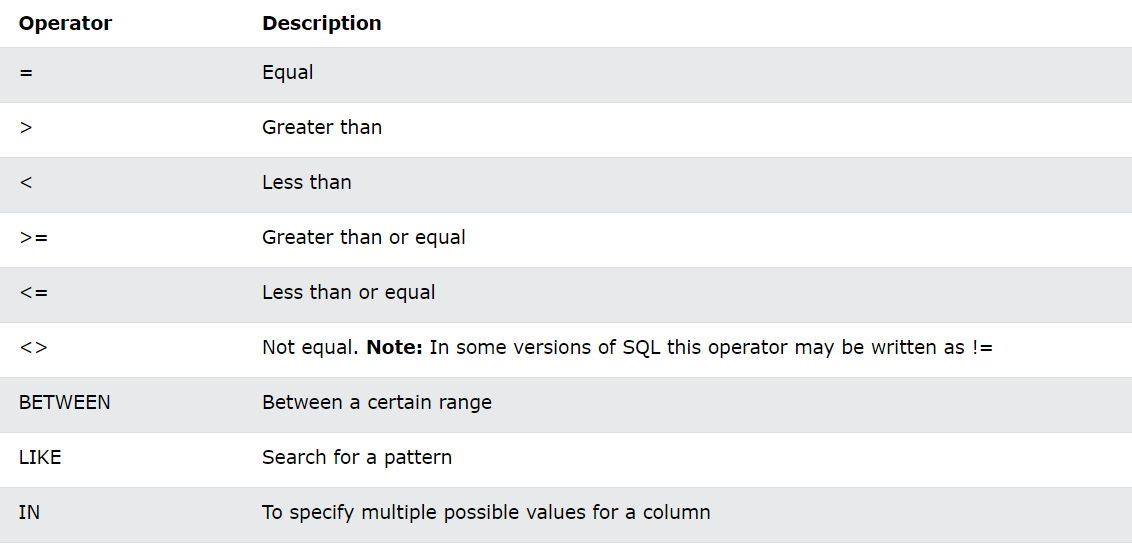
These operators can be used in the WHERE clause for specifying the conditions.
AND, OR and NOT
Using AND ,OR operators you can filter records based on more than one condition.
the NOT operator filter the record if the condition is not satisfied.
SELECT column_1, column_2, ...
FROM table_name
WHERE condition1 AND condition2 AND condition3 ...;
#---------------------------------------------------
SELECT column_1, column_2, ...
FROM table_name
WHERE condition1 OR condition2 OR condition3 ...;
#----------------------------------------------------
SELECT column_1, column_2, ...
FROM table_name
WHERE NOT condition;
Example:
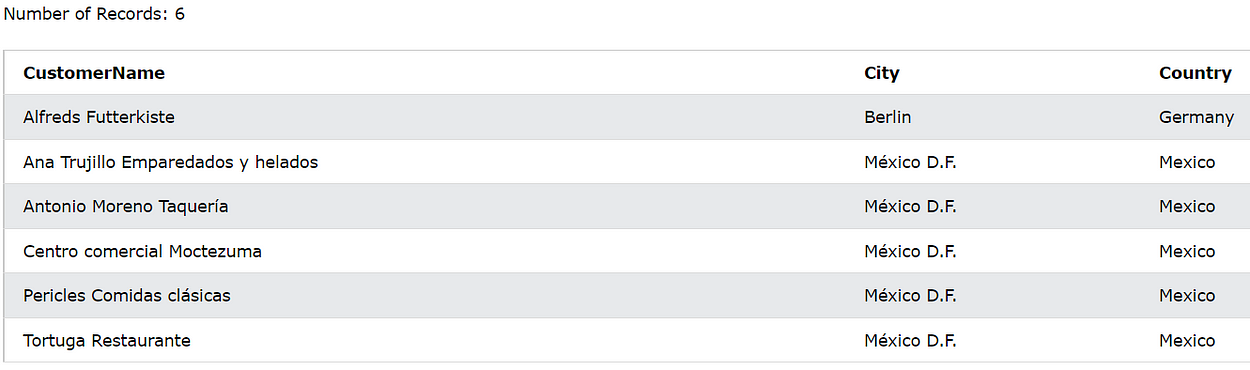
SELECT CustomerName, City, Country FROM Customers
WHERE Country=’Mexico’ OR City = “Berlin”;
ORDER BY
The keyword ORDER BY sorts the data in ascending order by default. using ORDER BY with DESC sorts the data in descending order.
syntax:
SELECT column_1, column_2, ...
FROM table_name
ORDER BY column_1, column_2, ... ASC|DESC;
At first, Column_1 will be sorted and then column_2 will be sorted and according to these two columns, the whole output will be sorted.ASC means ascending order and it is by default so we don’t need to mention ASC .
SELECT Country, City, Customername FROM Customers
ORDER BY Country,CITY ,CustomerName DESC;
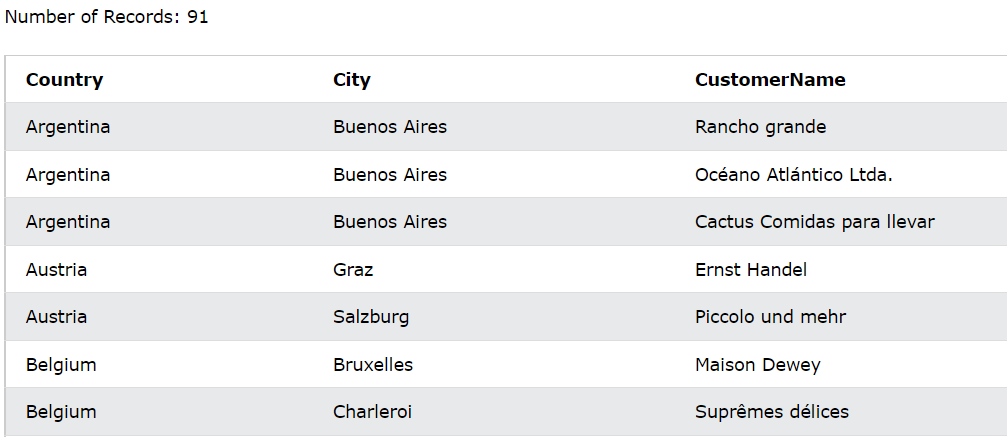
ORDER BY comes at the end of the SQL statement .
LIMIT-n
The LIMIT keyword is used to select only n-numbers of records from a big table.
SELECT Country, City, Customername FROM Customers
ORDER BY Country,CITY ,CustomerName DESC
LIMIT 5;
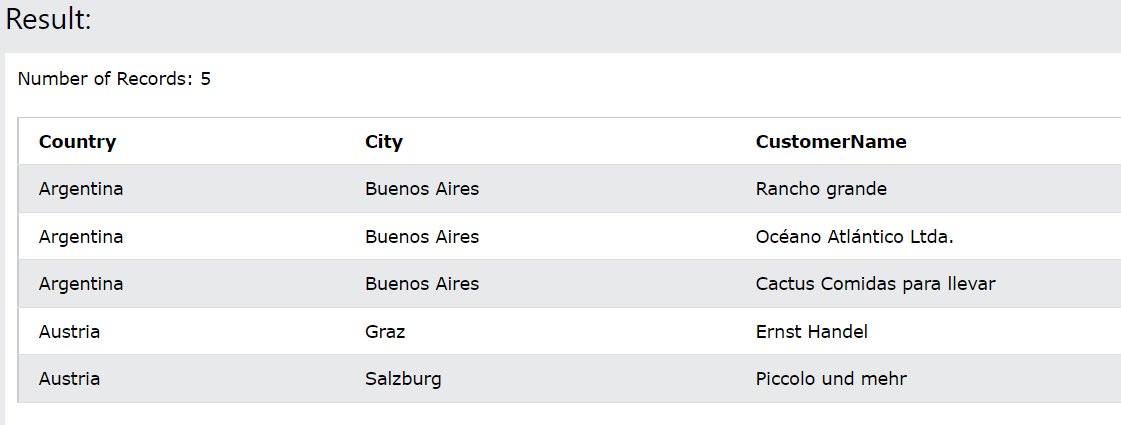
If you notice here only 5 records have been listed out.
MIN/MAX
The function MIN() in SQL returns the smallest value of the selected column and the function MAX()returns the biggest value in the selected column.
SELECT MIN(Price) , MAX(Price)
FROM Products;

If you see the column’s name it is MIN(Price) and MAX(Price). You can specify the Column name of records using the keywordAS.
SELECT MAX(Price) AS Maxprice , MIN(Price) AS Minprice
FROM Products;

The way we have used MIN(),MAX() we can use other aggregators like COUNT(), AVG(), and SUM() in the same way.
LIKE
The operator LIKE is used in WHERE clause to search specific string patterns.
There are 2 wildcards often used in LIKEoperator:-
- (%) → This represents zero or more than zero characters.
- (_) → This represents only one character.
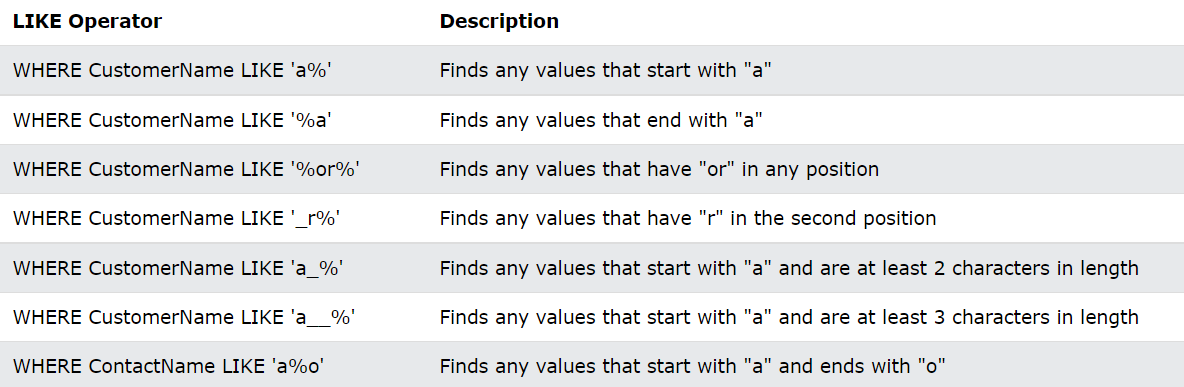
Syntax:
SELECT CustomerName FROM Customers
WHERE CustomerName LIKE 'a%' or CustomerName Like '%a'
Limit 5;
It will return all Customer name that starts with “a” or end on “a”.
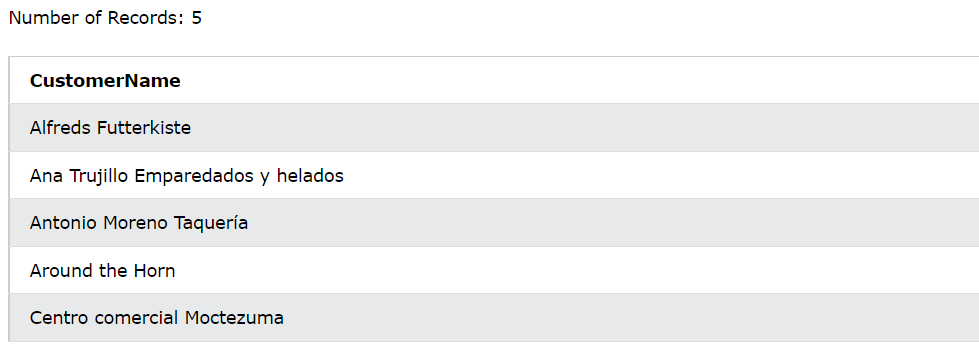
SQL Wildcards
Wildcards are used to substitute a string or to find patterns. Wildcards are used in LIKE clauses and LIKE are used in WHERE clauses.
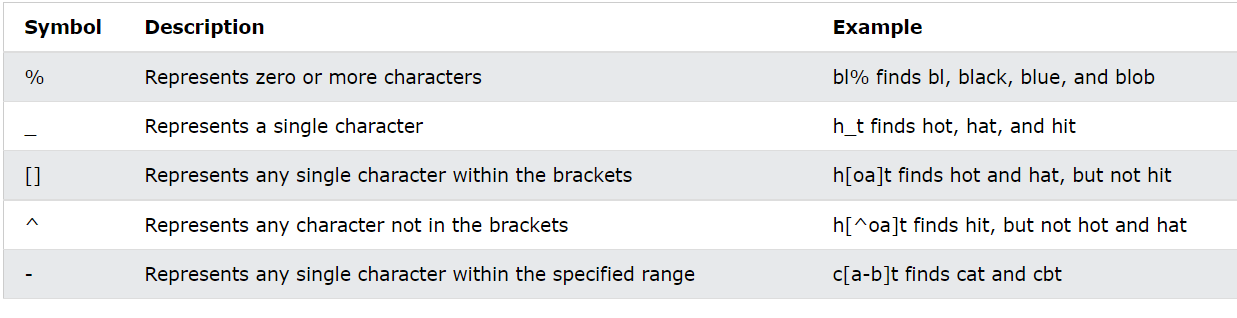
All these wildcards are used in the same way we used ( % ) and ( _ ).
IN
The operator IN allows us to specify multiple values in the WHERE statement. it also lets us write sub-queries in SQL.
SELECT column_name(s)
FROM table_name
WHERE column_name IN (value1, value2, ...);
#-------------SUBQUERIES------------------------------
SELECT column_name(s)
FROM table_name
WHERE column_name IN (SELECT STATEMENT);
Example:
SELECT * FROM Customers
WHERE Country IN ('Germany', 'France', 'UK','CANADA');
SQL Subquery
Using IN keyword we can write subqueries. a subquery is a query that we write within a query.
Example:
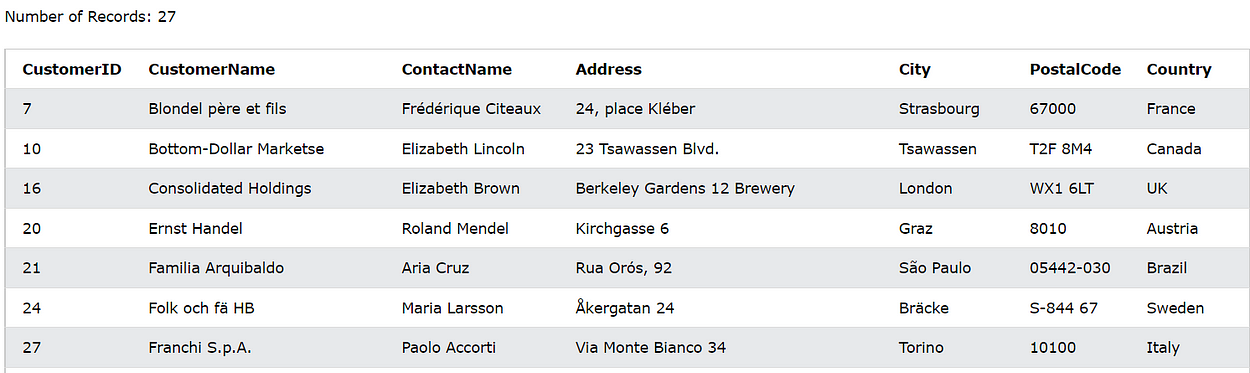
SELECT * FROM Customers WHERE
CustomerID IN (
SELECT CustomerID FROM orders
WHERE OrderDate > '1997-01-08');
This will return all the customer details who have placed the order after “1997–01–08”
BETWEEN
The operator BETWEEN selects values within a given range. these values can be numbers, dates, and texts. BETWEEN is used under the clauseWHERE.
syntax:
SELECT column_name(s)
FROM table_name
WHERE column_name BETWEEN value1 AND value2;
GROUP BY
The keyword GROUP BYgroup rows that have the same values in the selected column as summary rows.
Aggregator functions like COUNT(), MAX(), MIN(), SUM(), AVG() are often used in GROUP BY statement.
Syntax:
SELECT column_name(s)
FROM table_name
WHERE condition
GROUP BY column_name(s)
ORDER BY column_name(s);
Example:
SELECT COUNT(CustomerID) as customer_count, Country
FROM Customers
GROUP BY Country
ORDER BY customer_count;
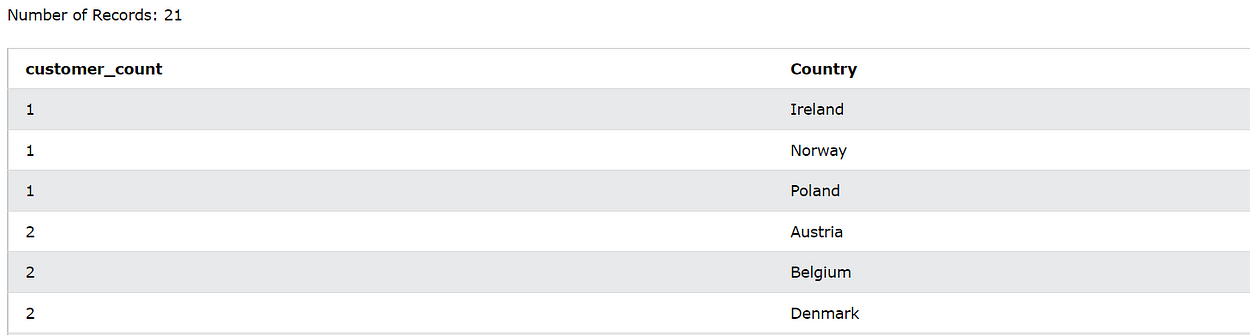
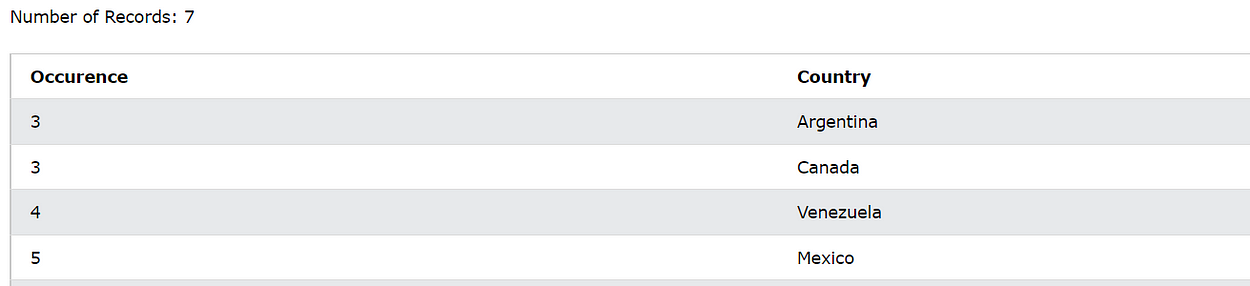
Note: After Grouping the rows we can not use WHERE Clause, only the keyword HAVINGcan be used to filter the grouped rows.
Example:
SELECT Count(Country) AS Occurence,Country
FROM Customers
WHERE LENGTH(Country)>5
GROUP BY Country
HAVING Occurence > 2
ORDER BY Occurence,Country;
Source – Author
SQL JOINS
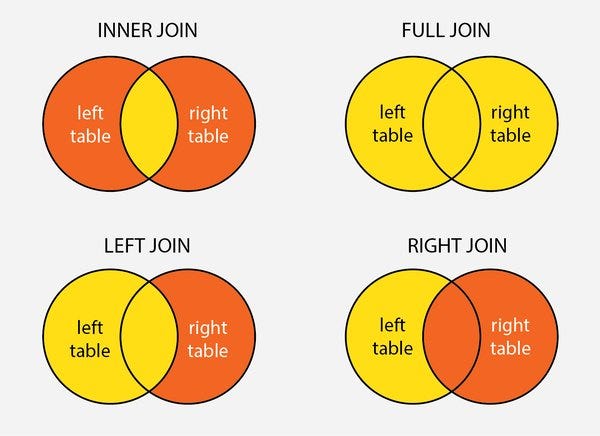
The clause JOINis used to combine rows from two or more than two tables, based on a related column between them.
Types of JOINs in SQL:
(INNER) JOIN: Returns all the rows from both the table that satisfies certain conditions.LEFT(OUTER) JOIN: Returns all rows from the left table along with the matching rows from the right table.RIGHT(OUTER) JOIN: Returns all rows from the right table and matching rows from the left table.FULL JOIN: Full join works as UNION in SQL.
Syntax:
SELECT table_1.column_1,table1.column_2,table_2.column1,....
FROM table_1
INNER JOIN table_2
ON table_1.matching_column = table_2.matching_column;
#-----------------------------------------------------
SELECT table_1.column_1,table_1.column_2,table_2.column_1,....
FROM table_1
OUTER/LEFT/RIGHT JOIN table_2
ON table_1.matching_column = table_2.matching_column;
This statement will return all the records where —
table_1.matching_column = table_2.matching_column.
Note: On the place of
INNER JOINwe can specify other types of joins ie.FULL JOIN, LEFT JOIN, RIGHT JOIN
Example:
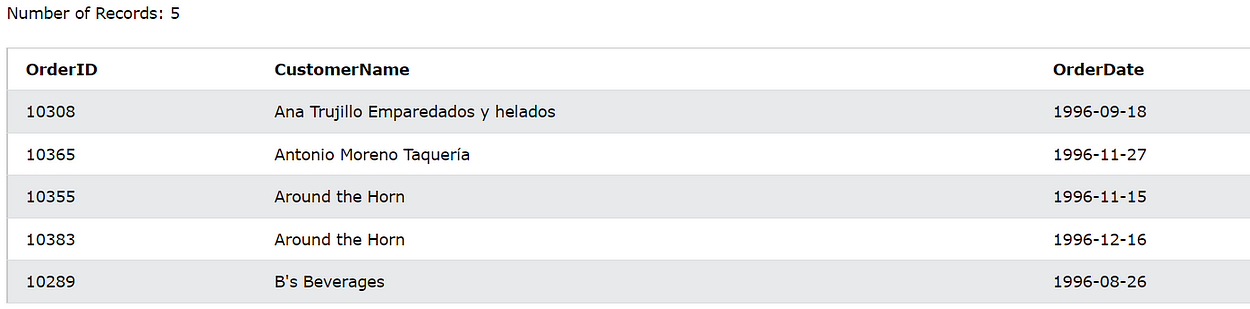
SELECT Orders.OrderID, Customers.CustomerName, Orders.OrderDate
FROM Orders
INNER JOIN Customers
ON Orders.CustomerID=Customers.CustomerID
ORDER BY CustomerName LIMIT 5;
Note: In order to join two tables, both must have a common attribute or column.
Conclusion
In this article, we have seen important SQL commands for creating, deleting, and updating databases and tables. We have seen how to select the rows from the database, how to apply grouping and aggregation. We saw various aggregator functions and various joins.


