

Introduction to Speeding up Pandas in Python
Apache Spark uses clusters to distribute any pandas operation and speeds up the computation.
Modin comes to the rescue!!!
What is Modin?


It is a library created by some data scientists at UC Berkeley. It uses parallel computation to process dataframe executions faster.
What Gives Modin The Edge?

-
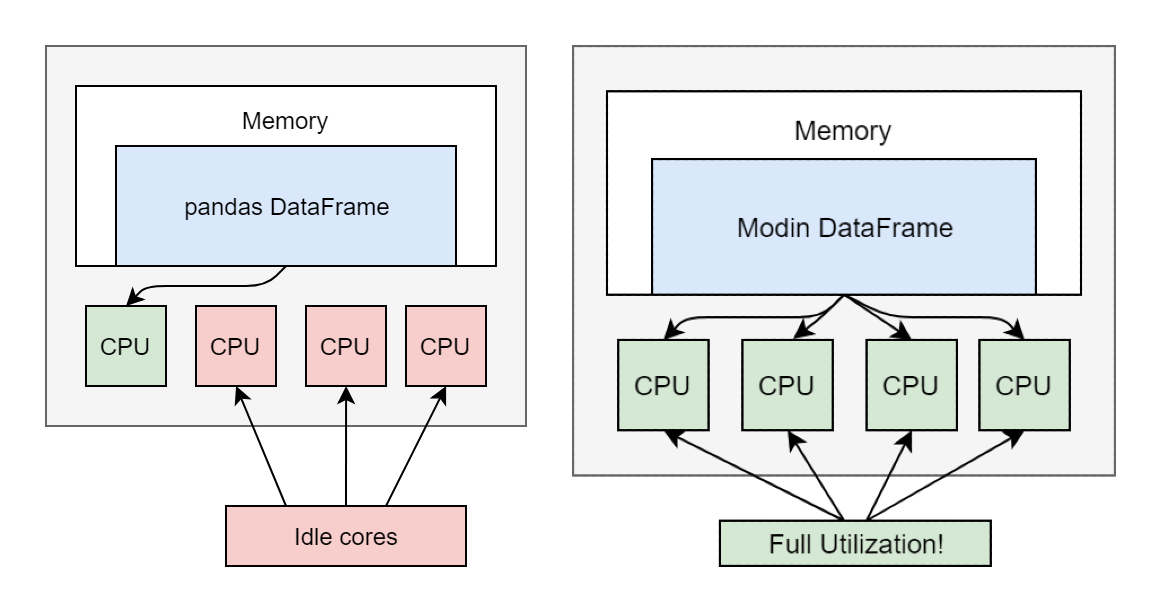
It allow only a single core to be used at a time.
-
Modin, on the other hand, enables us to use all CPU cores.
-
Also, Modin is lightweight and simple to integrate and use.
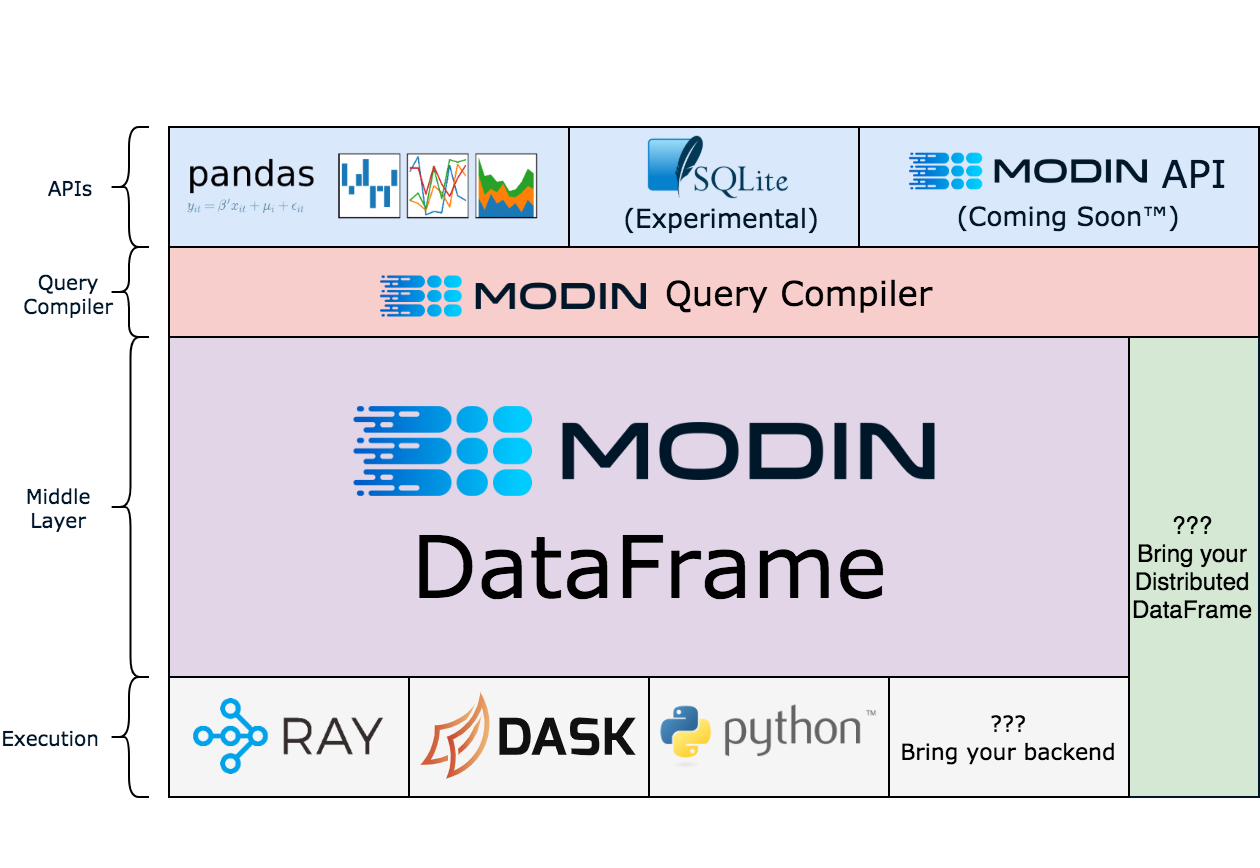
High-Level Architectural View

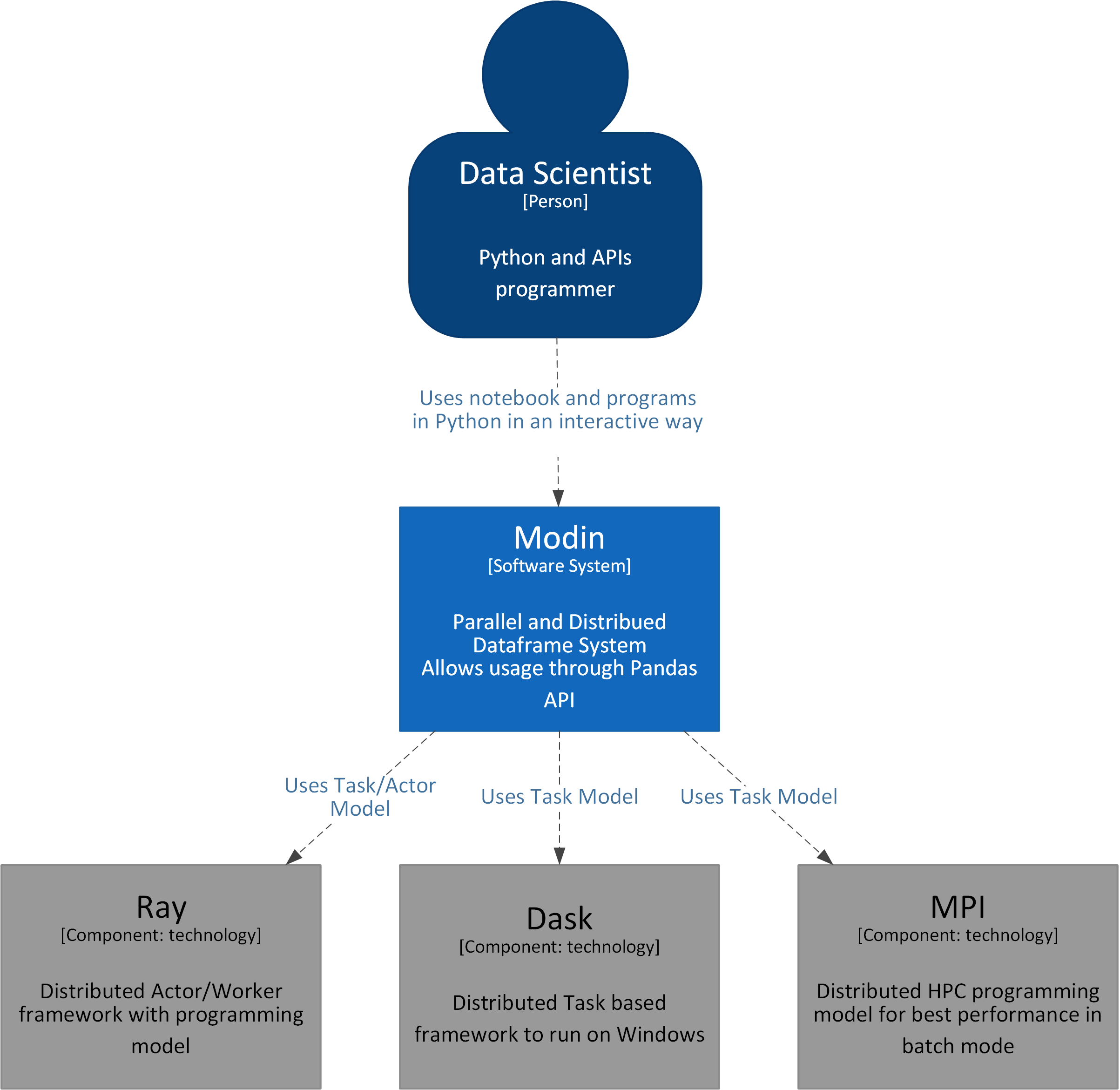
System View


Let’s look into the code:
Step 1: Installation
We can install Modin using the pip command:
pip install modin[all] # (Recommended) Install Modin with all of Modin's currently supported engines.
Step 2: Download the data
Download the sample dataset. We will use the new york yellow trip data. We will download the parquet file (approx 100 Mb).
Step 3: Import libraries
Import the relevant packages and initialize Ray for modin.
import pandas
import time
import modin.pandas as pd
import ray
ray.init()
Step 4: Use the Downloaded File
Give the path of the parquet file we downloaded in step 2
parquet_path = 'yellow_tripdata_2022-03.parquet'
Step 5: Actual Comparison
Run the functions for pandas and Modin.
- read_parquet(): this method is used to read data from a parquet file into a dataframe.
start = time.time()
pandas_df = pandas.read_parquet(parquet_path)
end = time.time()
pandas_duration = end - start
print("Time to read with pandas: {} seconds".format(round(pandas_duration, 3)))
start = time.time()
modin_df = pd.read_parquet(parquet_path)
end = time.time()
modin_duration = end - start
print("Time to read with Modin: {} seconds".format(round(modin_duration, 3)))
print("Modin is {}x faster than pandas at `read_parquet`!".
      format(round(pandas_duration / modin_duration, 2)))


- isnull() : It returns a dataframe where NULL values are replaced with TRUE, else FALSE.
start = time.time()
pandas_df.isnull()
end = time.time()
pandas_duration = end - start
print("Time with pandas: {} seconds".format(round(pandas_duration, 3)))
start = time.time()
modin_df.isnull()
end = time.time()
modin_duration = end - start
print("Time with Modin: {} seconds".format(round(modin_duration, 3)))
print("Modin is {}x faster than pandas at `is_null()`!".
      format(round(pandas_duration / modin_duration, 2)))


- fillna() : It replaces NULL values with the value specified in the parenthesis.
pandas_df.fillna(0)
end = time.time()
pandas_duration = end - start
print("Time with pandas: {} seconds".format(round(pandas_duration, 3)))
start = time.time()
modin_df.fillna(0)
end = time.time()
modin_duration = end - start
print("Time with Modin: {} seconds".format(round(modin_duration, 3)))
print("Modin is {}x faster than pandas at `is_null()`!".
      format(round(pandas_duration / modin_duration, 2)))


- apply(): It allows to execute a function across rows or columns of a dataframe.
It works with DataFrame or a Series.
start = time.time()
pandas_df["trip_distance"].apply(round)
end = time.time()
pandas_duration = end - start
print("Time with pandas: {} seconds".format(round(pandas_duration, 3)))
start = time.time()
modin_df["trip_distance"].apply(round)
end = time.time()
modin_duration = end - start
print("Time with Modin: {} seconds".format(round(modin_duration, 3)))
print("Modin is {}x faster than pandas at `apply()`!".
      format(round(pandas_duration / modin_duration, 2)))


- applymap(): It allows to execute a function across rows or columns of a dataframe.
Unlike apply, it works with a DataFrame only.
start = time.time()
pandas_df[["trip_distance"]].applymap(round)
end = time.time()
pandas_duration = end - start
print("Time with pandas: {} seconds".format(round(pandas_duration, 3)))
start = time.time()
modin_df[["trip_distance"]].applymap(round)
end = time.time()
modin_duration = end - start
print("Time with Modin: {} seconds".format(round(modin_duration, 3)))
print("Modin is {}x faster than pandas at `applymap()`!".
      format(round(pandas_duration / modin_duration, 2)))


- concat(): this method appends dataframe over an axis. Here, we will concat the original dataframe to itself 20 times – thus making it 20 times bigger in size.
start = time.time()
pandas.concat([pandas_df for _ in range(20)])
end = time.time()
pandas_duration = end - start
print("Time with pandas: {} seconds".format(round(pandas_duration, 3)))
start = time.time()
pd.concat([modin_df for _ in range(20)])
end = time.time()
modin_duration = end - start
print("Time with Modin: {} seconds".format(round(modin_duration, 3)))
print("Modin is {}x faster than pandas at `concat()`!".
      format(round(pandas_duration / modin_duration, 2)))


- to_csv(): this method is used to export a dataframe to a csv format.
start = time.time()
pandas_df.to_csv('Pandas_test.csv')
end = time.time()
pandas_duration = end - start
print("Time with pandas: {} seconds".format(round(pandas_duration, 3)))
start = time.time()
modin_df.to_csv('Mobin_test.csv')
end = time.time()
modin_duration = end - start
print("Time with Modin: {} seconds".format(round(modin_duration, 3)))
print("Modin is {}x faster than pandas at `to_csv()`!".
      format(round(pandas_duration / modin_duration, 2)))


- merge(): this method is used to join dataframes, here we will do a inner self join.
start = time.time()
pandas.merge(pandas_df.head(1000),pandas_df.head(1000),how='inner',
             left_on='VendorID',right_on='VendorID')
end = time.time()
pandas_duration = end - start
print("Time with pandas: {} seconds".format(round(pandas_duration, 3)))
start = time.time()
pd.merge(modin_df.head(1000),modin_df.head(1000),how='inner',
         left_on='VendorID',right_on='VendorID')
end = time.time()
modin_duration = end - start
print("Time with Modin: {} seconds".format(round(modin_duration, 3)))
print("Modin is {}x faster than pandas at `merge()`!".
      format(round(pandas_duration / modin_duration, 2)))


Performance Summary Statistics (Modin & Pandas)
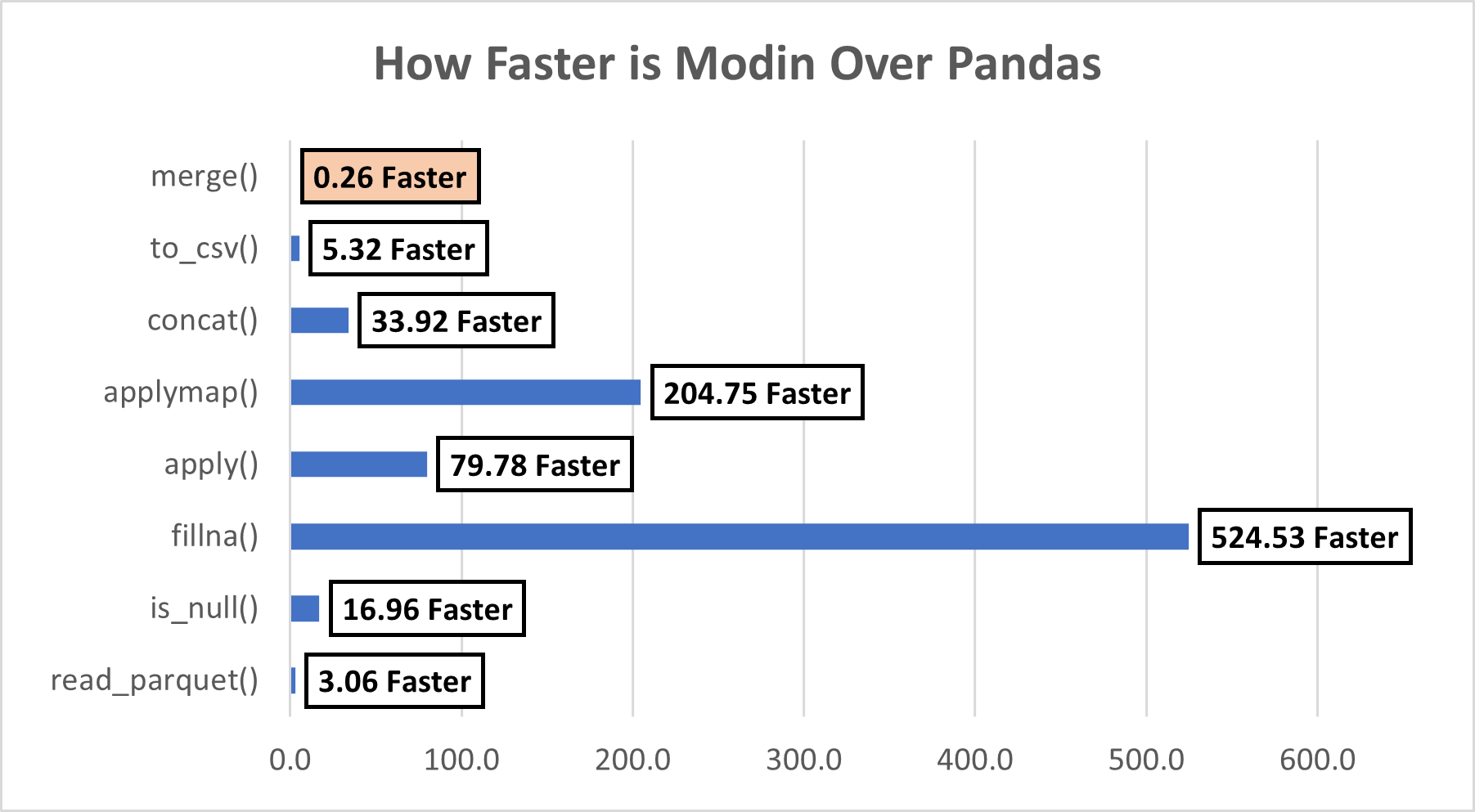
We performed several operations, let’s summarize them and see how faster Modin was our example. We can see that except for the merge() function, Modin beats Pandas in the remaining 7 functions. It seems there are some limitations of Modin, let’s look at those next.

Limitation
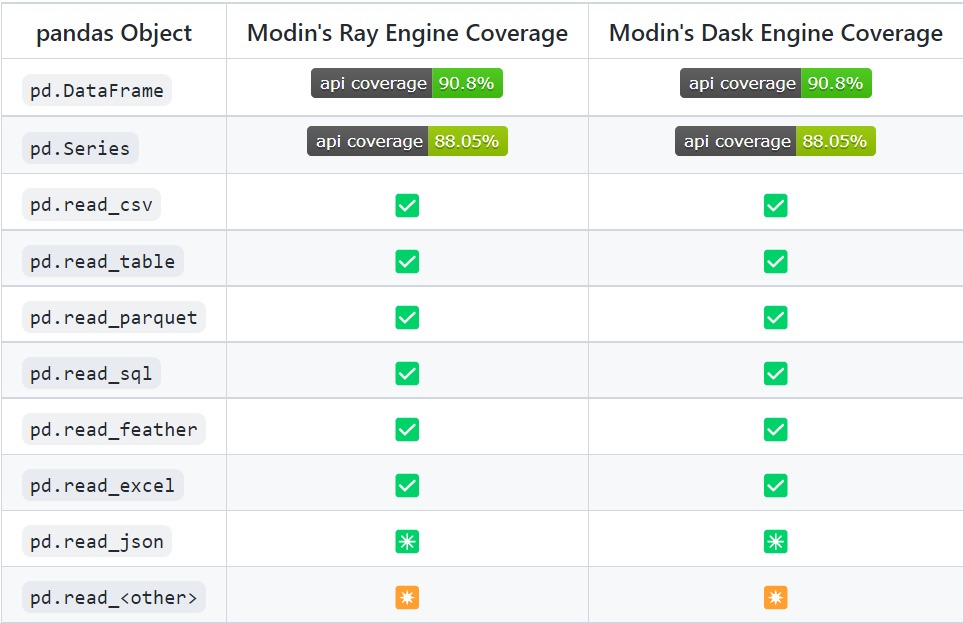
Currently, Modin can cover 90.8% of API methods.

Ok, But Why was Merge() Slower for Modin?
As per this link, currently Modin does not have support for the merge() function. In such cases, it uses the below approach:

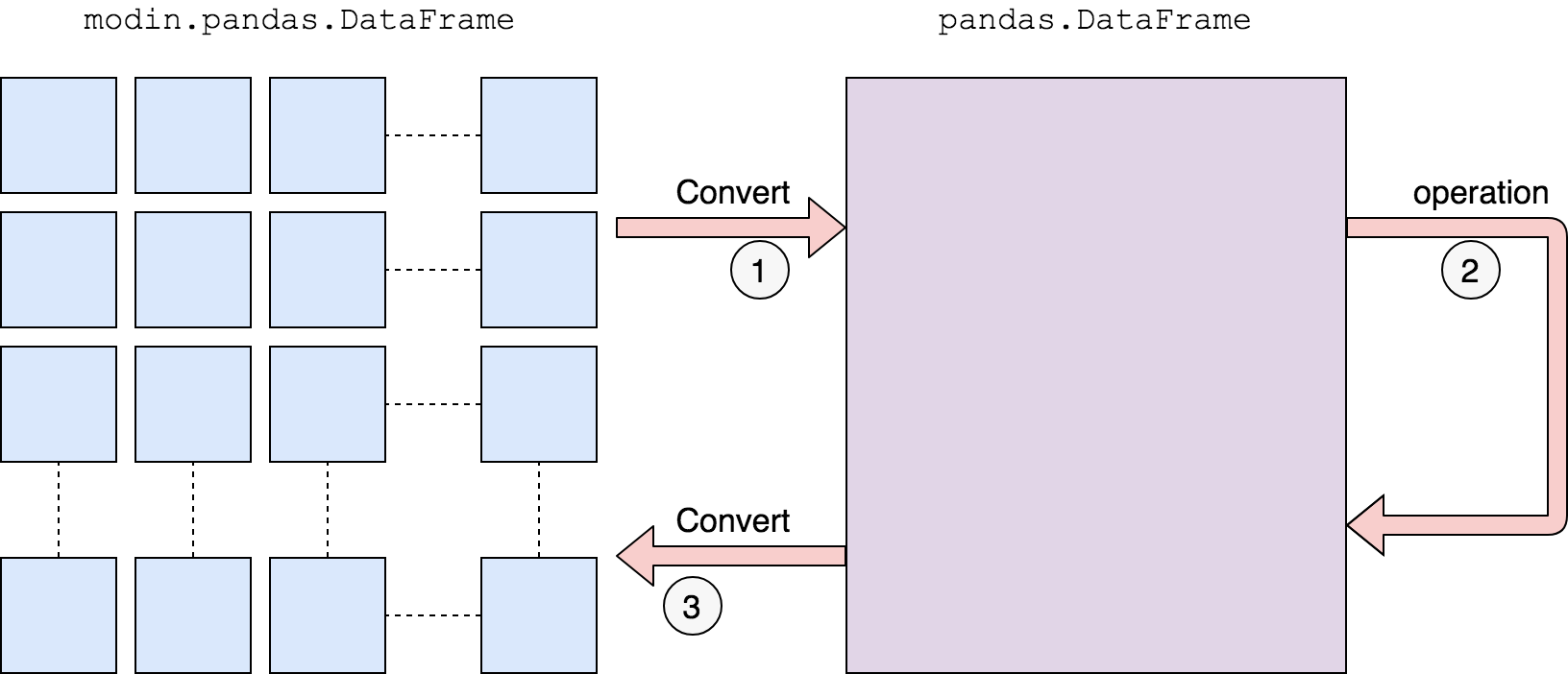
We first convert to a pandas DataFrame, then operate. There is a performance penalty for going from a partitioned Modin DataFrame to pandas because of the communication cost and single-threaded nature of pandas. Once the pandas operation has been completed, we convert the DataFrame back into a partitioned Modin DataFrame. This way, operations performed after something defaults to pandas will be optimized with Modin.
Modin vs. Dask DataFrame vs. Koalas (Pandas)

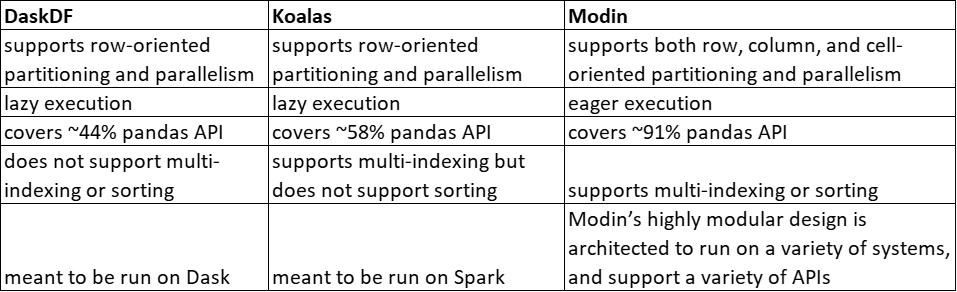

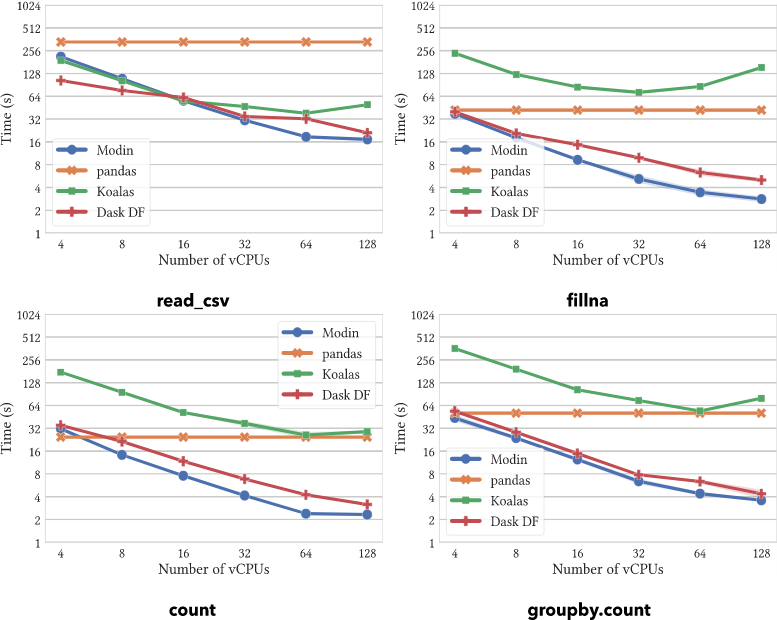
On operations supported by all systems, Modin provides substantial speedups. Modin can take advantage of multiple cores relative to both Koalas and DaskDF to efficiently execute its operations thanks to its optimized design. Notably, Koalasares often slower than pandas, due to the overhead of Spark.
Conclusion on Python
- Modin is a lightweight and user-friendly library. The API calls are similar to pandas. It can be easily integrated into python with a few lines of code.
- We don’t need to do any configuration before using Modin, even a beginner can easily use the library.
- Currently, Modin covers 90.8% of the pandas API methods. This is the reason why some functions ( like merge() ) are faster in pandas and slower in Modin. The developers are working on increasing this coverage.
- We also saw the performance lift of Modin over pandas. For a simple function like fillna(), it was observed that Modin was 524 times faster than pandas
- Modin is significantly faster as compared to Dask, Pandas, and Koalas.
This was a humble attempt to explore ways that can make the pandas’ execution faster.