





In this tutorial, I will show you how to deploy a Qwik application on Netlify. There is a great step-by-step guide to deploying on Netlify for general use, but this guide is specifically to show you how to deploy Qwik applications.
What is Qwik
Qwik is currently in Beta at the time of writing and may have changes. It is being developed by Miško Hevery and the team at Builder.io.
Qwik is a resumable JavaScript framework that renders server-side HTML to optimize performance. It completely removes the hydration step that other frontend frameworks use. The core principle of Qwik is to load as little JavaScript up front as possible and delay the execution of any other JavaScript on the page until it is needed. This allows the application to progressively download code without a big bundle right away. To make this work, Qwik uses an Optimizer written in Rust to transform the code at build time. Vite is used for Hot Module Replacement (HMR) and bundling code.
Qwik Rendering
Rendering on the web has swung like a pendulum from completely server-side to all static. We now have frameworks that can do hybrid rendering like Next.js and SvelteKit. However, because Qwik needs to progressively load JavaScript to improve the performance, it needs to be able to grab that from a server or server-side rendering (SSR). This may not fit into the true Jamstack architecture, but that doesn’t mean it can’t be hosted on Netlify. Platforms like Netlify can take the server side code and use it as serverless or edge functions. This is typically done with some type of adapter or plugin during the build step. In Qwik’s case, it uses the Netlify Edge functions with a Vite plugin. Read more about Netlify Edge here.
Getting Started with Qwik
The quickest (pun intended 😁) way to get started with a Qwik app that will be deployed to Netlify, is to use the command line interface — or CLI — tool. Type the following into a terminal to start the Qwik CLI.
npm init qwik@latest
This command opens the CLI that will prompt you with the following.
Qwik CLI
- Choose your project type, we are choosing a blank starter app to keep it simple.

- Choose Netlify as your hosting provider.

- Select packages you want configured automatically. Eslint and prettier for linting and code formatting, TailwindCSS is an option for styling.

- Success! Your Qwik app is created. Follow the next steps to install the dependencies and run the project locally.

Running the Qwik App
Once you have completed the steps in the CLI, change directory (cd), into your newly created project and install the dependencies with a package manager. The Qwik CLI suggests using npm.
cd qwik-app-name
npm install  # or yarn or pnpm
Then you can run the dev server to see the site locally with the npm startcommand.
npm start # or yarn or pnpm
Starter Application
Once through the steps of creating the application and installing the dependencies, you are on your way to deploying the app. If you used the CLI and chose Netlify as the hosting provider, a netlify.toml file already setup for you. If you happened to start here, you can create a netlify.toml file in the root that has the code below in it.
[build]
publish = "dist"
command = "npm run build"

Deploy Qwik Applications on Netlify
Netlify is a web developer platform that is known for making the web better by increasing productivity. If you are not already a Netlify user, go ahead and sign up for free. There are two ways we can deploy a Qwik site to Netlify, the Netlify CLI or a manual git deploy.
Netlify CLI deploy
The Netlify CLI is a way to configure, build, test, and deploy your sites without leaving the command line. If you don’t have the Netlify CLI installed, run the following command to install it globally.
npm install netlify-cli -g
Once installed, many commands can be ran with either the netlify {command} or ntl {command} for short. First, run the netlify logincommand to authenticate your Netlify account to the CLI. This will open a browser window, asking you to log in with Netlify and grant access to Netlify CLI.
To setup a new site using the CLI, run netlify init. This will guide you through the steps to get your site connected and deployed.
- If you don’t have your app connected to git, the Netlify CLI will ask if you want to deploy it manually or connect to a repo. Deploying manually will add more steps, to avoid this you can add your site to a git provider before running
netlify init.

- Either connect to an existing Netlify site, or create and configure a new site.

- Choose the team you would like to add the site to.

- Name your site or leave it blank for a random name. Once this is done, your site is created and your links are available, but the site is not yet deployed.

- Netlify will attempt to detect the build command and directory of the output for the app, but it can be customized in the next steps. For Qwik apps they are:

- Specify your functions directory if you are using Netlify functions.

- And success, your site is deployed!

Once configured, any new push to your git repository, git push, will trigger a new site build or by running netlify deploy --prod. Running netlify openwill open the Netlify admin URL for your new Qwik app on Netlify!
Deploy a Qwik Site from Git
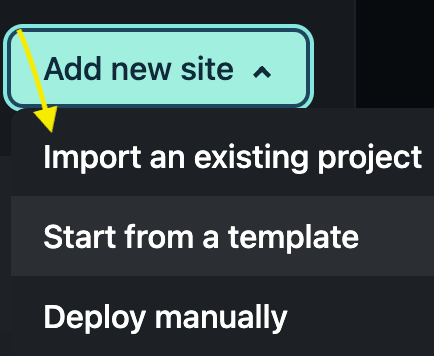
If you choose to do so, you can also manually deploy a Qwik app on Netlify. Once you have a git repository pushed, navigate to the Sites page in your Netlify dashboard and click the button “Add new site”.

A dropdown menu will appear that asks if you want to import an existing project, start from a template, or deploy manually. To get a site from git, you should choose the Import an existing project option.
That will bring you to a screen to connect your Git provider.

Choose the provider where the git repository for your app is located, then Netlify will authenticate and pop up a search for your available repos. Choose your repository, and Netlify will auto detect the framework and populate the build command and publish directory. If there is a custom build, you can edit the settings on this screen.

Click the Deploy site button and Netlify will begin deploying your application. Now your Qwik app is live!


