





Background story
In this blog we will learn how you can rename multiple files on a single click using Python programming. Usually doing this task take too many time and bit frustrating work, same thing I faced while I have to rename 315 files in a day ! not only rename but I need to change the content of these files with the same keyword (encoding like stuff ) which is going to renamed in file name. Yes, I need to check each and every files content, check whether the keyword which I’m gonna rename is present in that file, if yes, replace that keyword also by same word as file have. Really this was very tedious task for me but I decided to do smart work by renaming file and replacing keyword inside file using python programming.
Lets see how I chosen Python programming to do this task and you won’t believe if I say I had completed that task within 30 min (20 minute for programming logic + 10 minute for resolving errors and practising ).
Before that we need to understand few things so that it would help you to understand code effectively.
os.listdir()
listdir is the function which return the names of the files and directories/folders present inside particular path provided as a argument for this function. Definitely you already have idea how to install Python and run Python program so I’ll directly move to coding part and syntax.
Here is the syntax to use listdir() method:
import os
path = "/path/to/your/directory"
os.listdir(path)
In this syntax path would be the path to your directory. If you are using Windows operating system, your path would be something like this:
path = "C:\something\like\this"
Or else, If you are using any Linux distribution, your path would look like this:
path = "/something/like/this"
os.listdir(path) will return an array containing names of files and folders present at that path or location. For your reference I had some snapshots of output window (Terminal).

Regular expression module in python
Regular expression would help you to match the exact keyword from your file names/directory or from the content of your files using special character format. In python we have re module which will help us to perform various functions based upon regular expression. It provide too many built in method few of them which are widely used :
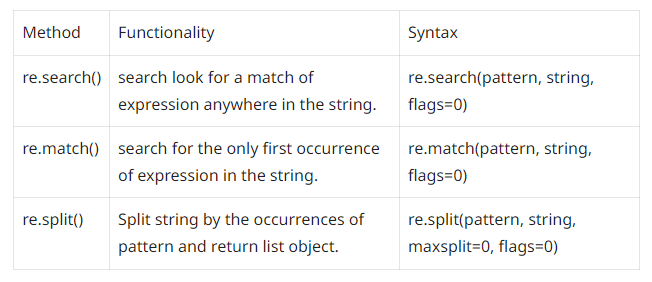
Few methods of re.
Also, there are too many other methods available. If you are curious and want to learn more about re and its method, I would suggest you to read official documentation of re module.
re.split()
As discussed in regular expression in python module split() method is used to split the string by the occurrences of pattern and return list object containing split strings.
Lets see how to split string into words by matching _ ( underscore ) pattern and see how it works:
import re
text = "The_Sky_Is_Blue"
split_words = re.split("_+", text)
print(split_words)

os.rename()
One more and last method, rename (), I would like to introduce which will help us to finally rename the filename or directory name present at the path which we have provided as a argument to this method.
rename() method take two arguments:
os.rename(src, dst)

#src: source path as original name to file or directory
#dst: destination path as new name to file or directory
Bit confusing!!😵💫 Lets have a look with actual example:
We want to rename a file present inside /example/old.txt by new name new.txt
import os

os.rename("/home/username/example/old.txt","/home/username/example/new.txt")

print "Renamed successfully"

# If you don't believe, check file name at that location :)
Rename / encode multiple file names using python
Now finally we are at the place where you have basic concepts and we are going to write actual code to rename multiple files at once!
Here is code for your reference:🎉
import os
import re

#rename file name
def main():
    path = "/home/username/example/"
    for filename in os.listdir(path):
        keyword = re.split('_+', filename)
        print(keyword)
        if keyword[1] == "one.txt":
            keyword[1] = "1.txt"

        elif keyword[1] == "two.txt":
            keyword[1] = "2.txt"

        elif keyword[1] == "three.txt":
            keyword[1] = "3.txt"

        elif keyword[1] == "four.txt":
            keyword[1] = "4.txt"

        elif keyword[1] == "five.txt":
            keyword[1] = "5.txt"


        renamedFile = '_'.join(map(str, keyword))
        source = path + filename
        destination = path + renamedFile
        os.rename(source, destination)
        print("Renamed Successfully")

if __name__ == '__main__':
    main()

In this example we have did something called encoding. I have a keyword which is going to be repeat in various file names and I had to encode that keyword with some other keyword so that keyword might occur 2 times, 3 times or may be 100 times ! but we encode these many files with single click.
Replace / encode keyword inside multiple files in a directory
Till now we have just encoded the file names but now we have to change content of these files too with that specific keyword. We will add one more function which will work for renaming file content or say encoding keyword with specific word.
Lets see how that function will look like:
oldKeyword = ["one", "two", "three", "four", "five"]
newKeyword = ["1", "2", "3", "4", "5"]

#replace or encode content of file
def modifyFileContent(destination):
    with open(destination, 'r+') as f:
        for i in range(len(oldKeyword)):
            if newKeyword[i] in destination:
                text = f.read()
                text = re.sub(oldKeyword[i], newKeyword[i], text)
                f.seek(0)
                f.write(text)
                f.truncate()
In above code, destination will be the path to the file or path o the renamed files which we renamed in previous code.
Complete code with some fancy stuff
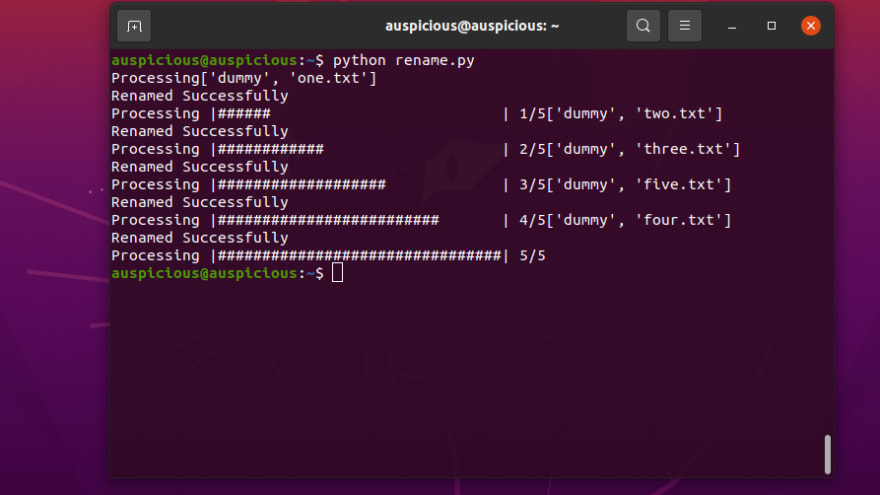
In our code lets add progress bar so that we can see the progress of renaming files and its content otherwise you will assume that screen is frizzed.
Before this we need to install progress package using pip.
pip install progress
Here is our complete code:
import os
import re
from progress.bar import Bar

bar = Bar('Processing', max=5)

#rename file name
def main():
    path = "/home/username/example/"
    for filename in os.listdir(path):
        keyword = re.split('_+', filename)
        print(keyword)
        if keyword[1] == "one.txt":
            keyword[1] = "1.txt"

        elif keyword[1] == "two.txt":
            keyword[1] = "2.txt"

        elif keyword[1] == "three.txt":
            keyword[1] = "3.txt"

        elif keyword[1] == "four.txt":
            keyword[1] = "4.txt"

        elif keyword[1] == "five.txt":
            keyword[1] = "5.txt"


        renamedFile = '_'.join(map(str, keyword))
        source = path + filename
        destination = path + renamedFile
        os.rename(source, destination)
        print("Renamed Successfully")
        modifyFileContent(destination)

oldKeyword = ["one", "two", "three", "four", "five"]
newKeyword = ["1", "2", "3", "4", "5"]

#replace or encode content of file
def modifyFileContent(destination):
    with open(destination, 'r+') as f:
        for i in range(len(oldKeyword)):
            if newKeyword[i] in destination:
                bar.next()
                text = f.read()
                text = re.sub(oldKeyword[i], newKeyword[i], text)
                f.seek(0)
                f.write(text)
                f.truncate()

if __name__ == '__main__':
    main()
    bar.finish()
Conclusion
In this post we have learned how to rename or encode file names of files present inside a directory and also we learned how we could encode the content of files with specific keyword.


