

Introduction
Face recognition is different from face detection. In face detection, we had only detected the location of human faces, and we recognized the identity of faces in the face recognition task.
In this article, we are going to build a face recognition system using python with the help of face recognition library .
There are many algorithms available in the market for face recognition. This broad computer vision challenge is detecting faces from videos and pictures. Many applications can be built on top of recognition systems. Many big companies are adopting recognition systems for their security and authentication purposes.
Use Cases of Recognition Systems
Face recognition systems are widely used in the modern era, and many new innovative systems are built on top of recognition systems.
There are a few used cases :
- Finding Missing Person
- Identifying accounts on social media
- Recognizing Drivers in Cars
- School Attendance System
Several methods and algorithms implement facial recognition systems depending on the performance and accuracy.
Traditional Face Recognition Algorithm
Traditional face recognition algorithms don’t meet modern-day’s facial recognition standards. They were designed to recognize faces using old conventional algorithms.
OpenCV provides some traditional facial Recognition Algorithms.
- Eigenfaces
- Scale Invariant Feature Transform (SIFT)
- Fisher faces
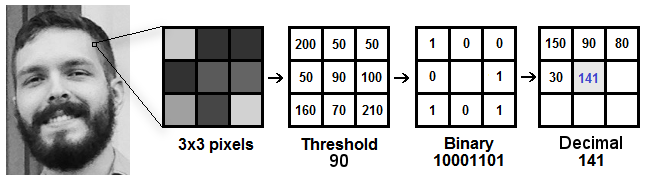
- Local Binary Patterns Histograms (LBPH)
These methods differ in the way they extract image information and match input and output images.
LBPH algorithm is a simple yet very efficient method still in use but it’s slow compared to modern days algorithms.

Deep Learning For Face Recognition
There are various deep learning-based facial recognition algorithms available.
- DeepFace
DeepIDseries of systems,- FaceNet
- VGGFace
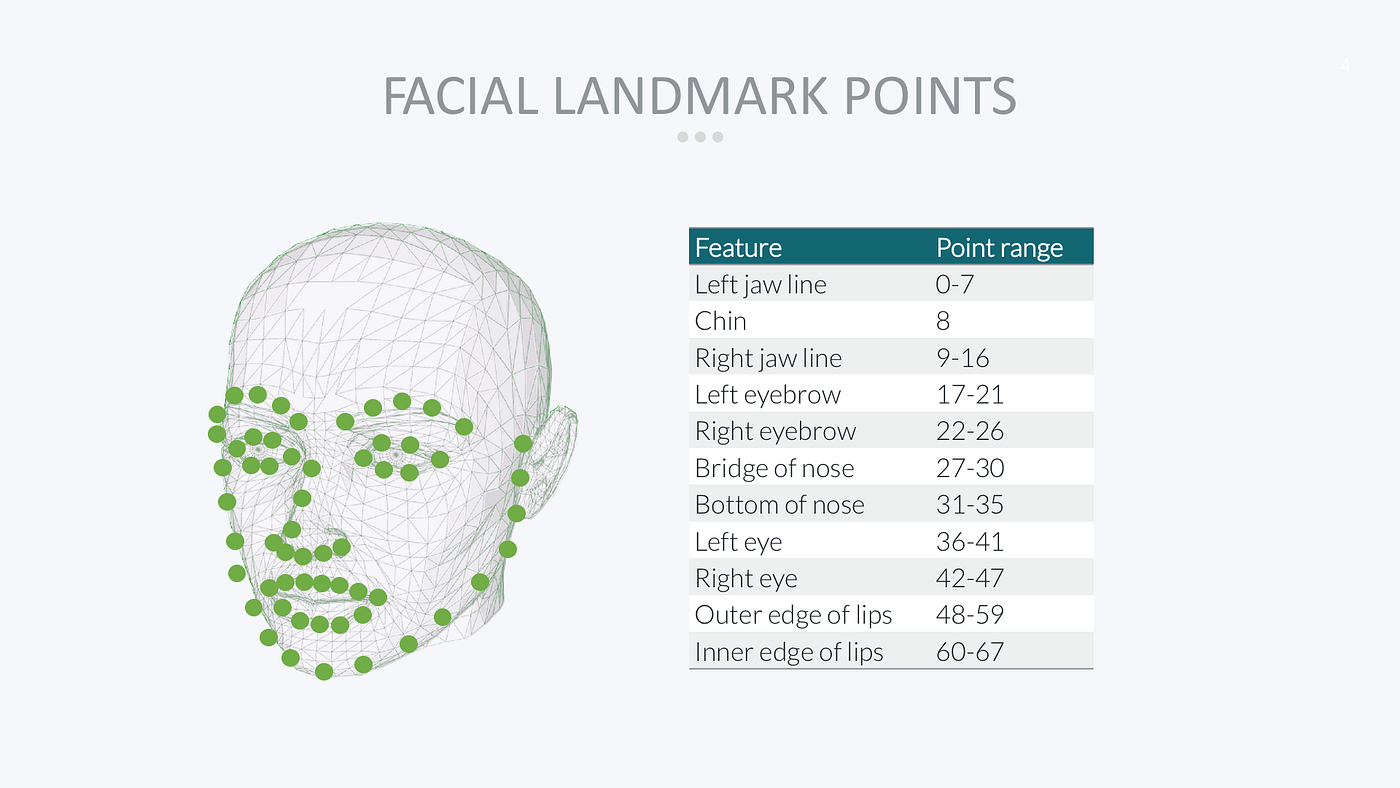
Generally, face recognizers that are based on landmarks take face images and try to find essential feature points such as eyebrows, corners of the mouth, eyes, nose, lips, etc. There are more than 60 points.

Source: Medium.com
Steps Involved in Face Recognition
- Face Detection: Locate the face, note the coordinates of each face locate,d and draw a bounding box around every faces.
- Face Alignments. Normalize the faces in order to attain fast training.
- Feature Extraction. Local feature extraction from facial pictures for training, this step is performed differently by different algorithms.
- Face Recognition. Match the input face with one or more known faces in our dataset.

Source: wp.com
This article focuses on implementing face recognition using the library face_recognition, built on deep learning techniques and promises accuracy greater than 96% using a single training image.
Implementation
Implementing a face recognition system using python. Implementing a Deep learning-based face recognition system using the face_recognition library.
1. Setting face recognition libraries:
In order to install the face recognition library, we need to first install the dlib.
dlib: It is a modern C++ toolkit that contains ML-related algorithms and tools.
# installing dlib
pip install dlib
face recognitionThe actual face recognition library can be installed afterdlib.
# installing face recognition
pip install face recognition
Opencvfor some image pre-processing
# installing opencv
pip install opencv

Note: Sometimes installing dlib throws error in that case install install the C++ development toolkit using vs_code community .
Importing Libraries
import cv2
import numpy as np
import face_recognition
2. Loading Image:
We are done with installing and importing the libraries. It’s time to load some sample images to the face_recognition library.
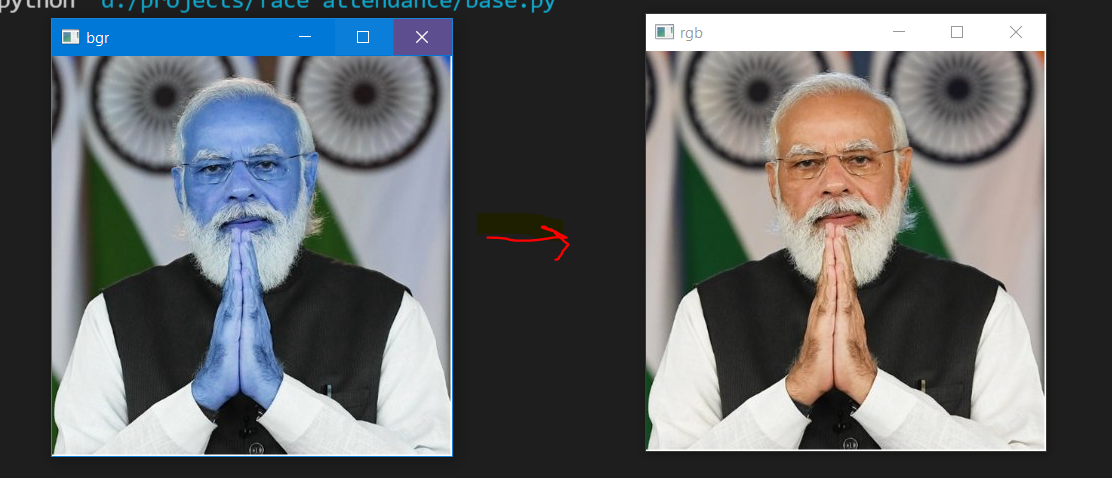
The library face_recognitionsupports only the BGR format of images. While printing the output image we should convert it into RGB using OpenCV.
Face_recognition Loads images only in BGR format.
import cv2
import numpy as np
import face_recognition
img_bgr = face_recognition.load_image_file('student_images/modi.jpg')
img_rgb = cv2.cvtColor(img_bgr,cv2.COLOR_BGR2RGB)
cv2.imshow('bgr', img_bgr)
cv2.imshow('rgb', img_rgb)
cv2.waitKey
Output → BGR vs RGB

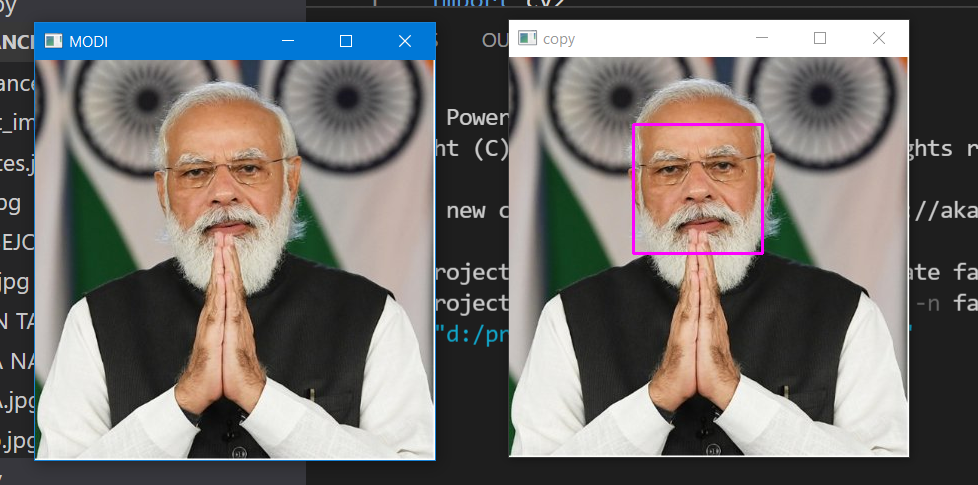
3. Detecting and Locating Faces:
The library face_recognitioncan quickly locate faces on its own, we don’t need to use haar_cascade and other techniques.
img_modi=face_recognition.load_image_file('student_images/modi.jpg')
img_modi_rgb = cv2.cvtColor(img_modi,cv2.COLOR_BGR2RGB)
#--------- Detecting Face -------
face = face_recognition.face_locations(img_modi_rgb)[0]
copy = img_modi_rgb.copy()
# ------ Drawing bounding boxes around Faces------------------------
cv2.rectangle(copy, (face[3], face[0]),(face[1], face[2]), (255,0,255), 2)
cv2.imshow('copy', copy)
cv2.imshow('MODI',img_modi_rgb)
cv2.waitKey(0)

4. Sample Image Recognition:
The library face_recognition is based on deep learning, it supports single-shot learning which means it needs a single picture to train itself to detect a person.
img_modi = face_recognition.load_image_file('student_images/modi.jpg')
img_modi = cv2.cvtColor(img_modi,cv2.COLOR_BGR2RGB)
#------to find the face location
face = face_recognition.face_locations(img_modi)[0]
#--Converting image into encodings
train_encode = face_recognition.face_encodings(img_modi)[0]
#----- lets test an image
test = face_recognition.load_image_file('student_images/modi2.jpg')
test = cv2.cvtColor(test, cv2.COLOR_BGR2RGB)
test_encode = face_recognition.face_encodings(test)[0]
print(face_recognition.compare_faces([train_encode],test_encode))
cv2.rectangle(img_modi, (face[3], face[0]),(face[1], face[2]), (255,0,255), 1)
cv2.imshow('img_modi', img_modi)
cv2.waitKey(0)
The above code took two pictures of the prime minister, and it returnedTrue because both photos were of the same person.
face_recognition.face_encodings(imgelon)[0]→Returns encoding of passed Image.face_recognition.compare_faces([train_encode],test_encode)→ Takes a list of trained encodings and a test encoding of the unknown Image. It returnsTrueif both test encoding has a match in train encoding; otherwise, it returns.False.
Understand the Working of Face Recognition
- We pass the person’s picture to the model and their name.
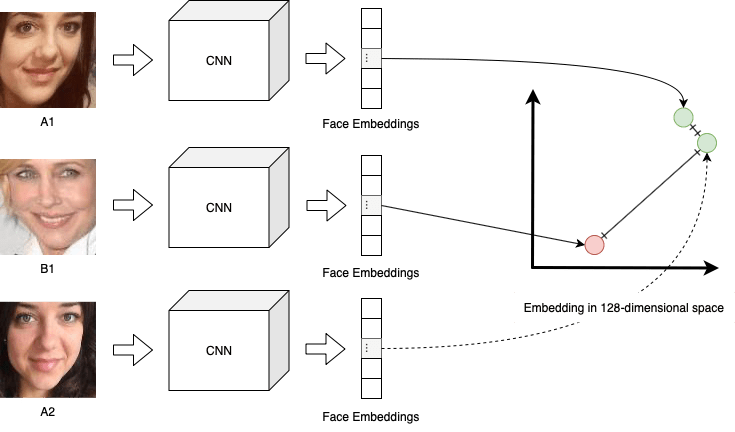
- The model takes every picture, converts them into some numerical encoding, and stores them in a list and all the labels(names of persons) in another list.
- In the Prediction Phase when we pass a picture of an unknown person recognition model converts the unfamiliar person’s Image into encoding.
- After converting an unknown person’s Image into encoding, it tries to find the most similar encoding based on the distance parameter. The store encoding with the least distance from the encoding of an unknown person will be the closest match.
- After getting the closest match encoding, we take the index of that encoding from that list and use indexing. We find the detected person’s name.
Challenges in Recognition Systems
These are significant challenges faced by recognition systems and need to be resolved.
- Pose: Recognition systems are susceptible to the human pose. Facial recognition systems will not be able to predict if the person’s face is not visible.
- Illumination: Illumination changes the face contours drastically. Pictures for face recognition should be taken in proper lighting conditions.
- Facial Expressions: Different facial expressions can result in different predictions of the same person’s Image.
- Low Resolution: Low-resolution pictures contain less information, hence not good for face recognition training.
Conclusion
This article discussed how to implement a face recognition system using python with a single-shot image training technique. You can further use GUI like python Tkinter to design a GUI-based attendance system. We saw various challenges that affect a recognition system and how to solve them.