





We all spend a good chuck of our time debugging, sifting through logs or reading tracebacks. Each of these can be difficult and time-consuming and in this article we will focus on making the last one – dealing with tracebacks and exceptions – as easy and efficient as possible.
To achieve this we will learn how to implement and use custom Exception Hooks that will remove all the noise from tracebacks, make them more readable and display just the information we need to troubleshoot our code and exceptions in Python. On top of that, we will also take a look at awesome Python libraries that provide ready to use exception hooks with beautiful tracebacks, which can be installed and used without any additional coding.
Exception Hooks
Whenever exception is raised and isn’t handled by try/except block, a function assigned to sys.excepthook is called. This function – called Exception Hook – is then used to output any relevant information to standard output using the 3 arguments it receives – type, value and traceback.
Let’s now look at a minimal example to see how this works:
import sys

def exception_hook(exc_type, exc_value, tb):
    print('Traceback:')
    filename = tb.tb_frame.f_code.co_filename
    name = tb.tb_frame.f_code.co_name
    line_no = tb.tb_lineno
    print(f"File {filename} line {line_no}, in {name}")

    # Exception type and value
    print(f"{exc_type.__name__}, Message: {exc_value}")

sys.excepthook = exception_hook
In the above example we leverage each of the arguments to provide basic traceback data in output. We use traceback (tb) object to access the traceback frame which contains data describing where the exception occurred – that is – filename (f_code.co_filename), function/module name (f_code.co_name) and line number (tb_lineno).
Apart from that, we also print information about exception itself using the exc_type and exc_value variables.
With this hook in place, we can invoke a function that raises some exception and we will receive the following output:
def do_stuff():
    # ... do something that raises exception
    raise ValueError("Some error message")

do_stuff()

# Traceback:
# File /home/some/path/exception_hooks.py line 22, in <module>
# ValueError, Message: Some error message
The above example provides some information about exception, but to get all the information needed for debugging, as well as a full picture of where and why the exception happened, we need to dig a bit deeper into the traceback object:
def exception_hook(exc_type, exc_value, tb):

    local_vars = {}
    while tb:
        filename = tb.tb_frame.f_code.co_filename
        name = tb.tb_frame.f_code.co_name
        line_no = tb.tb_lineno
        print(f"File {filename} line {line_no}, in {name}")

        local_vars = tb.tb_frame.f_locals
        tb = tb.tb_next
    print(f"Local variables in top frame: {local_vars}")

...

# File /home/some/path/exception_hooks.py line 41, in <module>
# File /home/some/path/exception_hooks.py line 7, in do_stuff
# Local variables in top frame: {'some_var': 'data'}
As you can see here, the traceback object (tb) is actually a linked list of all the exceptions that occurred – a stacktrace. This allows us to loop through it using tb_next and print information for each frame. On top of that, we can also use tb_frame.f_locals attribute to dump local variables to console, which can also aid in debugging.
Digging through the traceback object like we saw above works, but it’s cumbersome and becomes quite unreadable very quickly. Better solution is to use traceback module instead, which provides lots of helper functions for extracting information about exceptions.
So, now that we know the basics, let’s see how we can build our own exception hooks with some real, useful features…
Make Your Own
There are more things that we can do then just dump data on stdout. One of them would be logging the output to a file automatically:
LOG_FILE_PATH = "./some.log"
FILE = open(LOG_FILE_PATH, mode="w")

def exception_hook(exc_type, exc_value, tb):
    FILE.write("*** Exception: ***\n")
    traceback.print_exc(file=FILE)

    FILE.write("\n*** Traceback: ***\n")
    traceback.print_tb(tb, file=FILE)

# *** Exception: ***
# NoneType: None
#
# *** Traceback: ***
#   File "/home/some/path/exception_hooks.py", line 82, in <module>
#     do_stuff()
#   File "/home/some/path/exception_hooks.py", line 7, in do_stuff
#     raise ValueError("Some error message")
This can be useful if you want to preserve information about uncaught exception for later debugging.
By default, uncaught exception will go to stderr, which might be undesirable if you have a logging setup in place and want the logger to take care of the error output. You could use following hook to allow logger to take care of these exceptions:
import logging
logging.basicConfig(
    level=logging.CRITICAL,
    format='[%(asctime)s] {%(pathname)s:%(lineno)d} %(levelname)s - %(message)s',
    datefmt='%H:%M:%S',
    stream=sys.stdout
)

def exception_hook(exc_type, exc_value, exc_traceback):
    logging.critical("Uncaught exception:", exc_info=(exc_type, exc_value, exc_traceback))


# [17:28:33] {/home/some/path/exception_hooks.py:117} CRITICAL - Uncaught exception:
# Traceback (most recent call last):
#   File "/home/some/path/exception_hooks.py", line 122, in <module>
#     do_stuff()
#   File "/home/some/path/exception_hooks.py", line 7, in do_stuff
#     raise ValueError("Some error message")
# ValueError: Some error message
The first thing that comes to mind when trying to improve the console output is making it pretty by giving it some colours highlighting the important bits:
# pip install colorama
from colorama import init, Fore
init(autoreset=True)  # Reset the color after every print

def exception_hook(exc_type, exc_value, tb):

    local_vars = {}
    while tb:
        filename = tb.tb_frame.f_code.co_filename
        name = tb.tb_frame.f_code.co_name
        line_no = tb.tb_lineno
        # Prepend desired color (e.g. RED) to line
        print(f"{Fore.RED}File {filename} line {line_no}, in {name}")

        local_vars = tb.tb_frame.f_locals
        tb = tb.tb_next
    print(f"{Fore.GREEN}Local variables in top frame: {local_vars}")
There’s obviously much more you could do, for example printing local variables in each frame, or even lookup variables that were referenced on the line on which the exception occurred. Unsurprisingly, exception hooks for these use-cases already exist, so instead of dumping the code on you, I’d suggest you take a look at their source code from which you can draw some inspiration.
- printing local variables from each frame
- printing relevant info for each frame (referenced variables)
Finally, I want to include a word of caution, whenever you decide to install an exception hook, be aware that libraries can install their own hooks, so make sure you don’t override those. In those cases you can instead catch the exception and use except block to output information you want to see, for example by using sys.exc_info().
Awesome Hooks in The Wild
Building your own exception hook can be a fun little exercise, but there are already quite a few cool ones out there. So, instead of reinventing a wheel, let’s rather look at what we can just grab and start using immediately.
First and my favourite being Rich:
# https://rich.readthedocs.io/en/latest/traceback.html
# pip install rich
# python -m rich.traceback

from rich.traceback import install
install(show_locals=True)

do_stuff()  # Raises ValueError

The installation is super easy, all you need to do is install the library, import it and run install function which puts exception hook in place. If you want to just check out a sample output without writing Python code, then you can also use python -m rich.traceback.
Another popular option is better_exceptions. It also produces nice output, but requires a little more setup:
# https://github.com/Qix-/better-exceptions
# pip install better_exceptions
# export BETTER_EXCEPTIONS=1

import better_exceptions
better_exceptions.MAX_LENGTH = None
# Check if you TERM variable is set to `xterm`, if not set below variable - https://github.com/Qix-/better-exceptions/issues/8
better_exceptions.SUPPORTS_COLOR = True
better_exceptions.hook()

do_stuff()  # Raises ValueError
In addition to installing the library with pip we also need to set BETTER_EXCEPTIONS=1 environment variable to enable it. Next, we need the above Python code for setup. The most important part being the call to hookfunction which installs the exception hook. Additionally, we also set SUPPORTS_COLOR to True which might be necessary depending on the terminal you’re using – more specifically – you will need this if your TERMvariable is set to anything other than xterm.

Next up is pretty_errors library. This one is definitely the easiest one to configure, requiring just an import:
# https://github.com/onelivesleft/PrettyErrors/
# pip install pretty_errors

import pretty_errors
# `configure` can be omitted if you're satisfied with default settings
pretty_errors.configure(
    filename_display    = pretty_errors.FILENAME_EXTENDED,
    line_number_first   = True,
    display_link        = True,
    line_color          = pretty_errors.RED + '> ' + pretty_errors.default_config.line_color,
    code_color          = '  ' + pretty_errors.default_config.line_color,
    truncate_code       = True,
    display_locals      = True
)

do_stuff()
Apart from the mandatory import, the above snippet also shows optional configuration for the library. This is just a small sample of what you can configure to produce below output. The full list of config options can be found here.

Next one is a library whose output style will be familiar to everyone who uses Jupyter notebook. It’s IPython’s ultratb module which provides a couple of options for very pretty and readable exception and traceback error outputs:
# https://ipython.readthedocs.io/en/stable/api/generated/IPython.core.ultratb.html
# pip install ipython
import IPython.core.ultratb

# Also ColorTB, FormattedTB, ListTB, SyntaxTB
sys.excepthook = IPython.core.ultratb.VerboseTB(color_scheme='Linux')  # Other colors: NoColor, LightBG, Neutral

do_stuff()
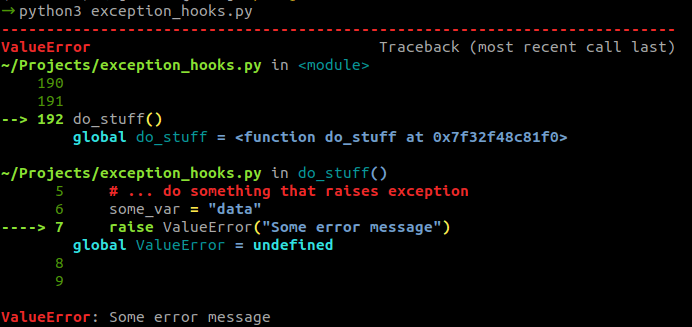
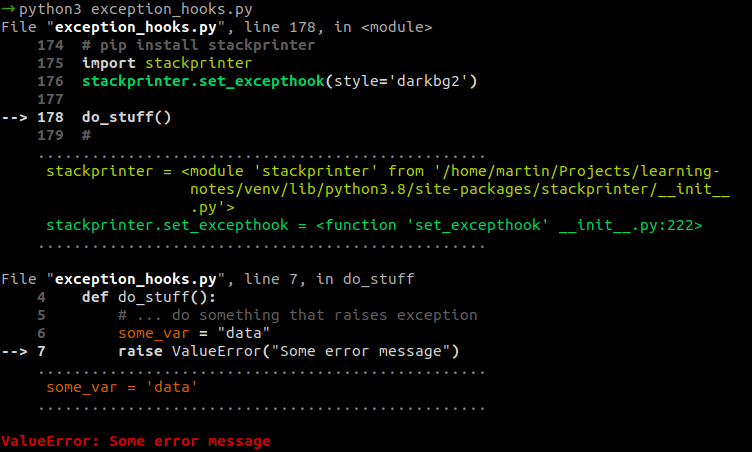
Last but not least is stackprinter library which produces concise output with all the debugging information you might need. Again, all you need to do to set it up is install the exception hook:
# https://github.com/cknd/stackprinter
# pip install stackprinter
import stackprinter
stackprinter.set_excepthook(style='darkbg2')

do_stuff()
Conclusion
In this article we learned how to write an exception hook, but I don’t actually recommend writing and using your own hooks. Implementing one such hook could be a fun exercise, but probably not a worthwhile effort. You’re better off using one of the awesome hooks presented above and calling it a day.
I do however, strongly recommend choosing one of them and installing it across all the projects you’re working on, both for improved debugging, but also for consistency. The more you use one of these exception hooks, the more used you will become to its output and consequently, the more benefit you will get from using it.


