


• Latest
  • Trending
Microsoft Defender now isolates hacked, unmanaged Windows devices

Microsoft Defender now isolates hacked, unmanaged Windows devices

June 10, 2022
Absa and Visa Extend Strategic Partnership to Advance Growth and Innovation Across Africa

Absa and Visa Extend Strategic Partnership to Advance Growth and Innovation Across Africa

July 29, 2025
French Telco Orange Hit by Cyber-Attack

French Telco Orange Hit by Cyber-Attack

July 29, 2025
ATC Ghana supports Girls-In-ICT Program

ATC Ghana supports Girls-In-ICT Program

April 25, 2023
Vice President Dr. Bawumia inaugurates  ICT Hub

Vice President Dr. Bawumia inaugurates ICT Hub

April 2, 2023
Co-Creation Hub’s edtech accelerator puts $15M towards African startups

Co-Creation Hub’s edtech accelerator puts $15M towards African startups

February 20, 2023
Data Leak Hits Thousands of NHS Workers

Data Leak Hits Thousands of NHS Workers

February 20, 2023
EU Cybersecurity Agency Warns Against Chinese APTs

EU Cybersecurity Agency Warns Against Chinese APTs

February 20, 2023
How Your Storage System Will Still Be Viable in 5 Years’ Time?

How Your Storage System Will Still Be Viable in 5 Years’ Time?

February 20, 2023
The Broken Promises From Cybersecurity Vendors

Cloud Infrastructure Used By WIP26 For Espionage Attacks on Telcos

February 20, 2023
Instagram and Facebook to get paid-for verification

Instagram and Facebook to get paid-for verification

February 20, 2023
YouTube CEO Susan Wojcicki steps down after nine years

YouTube CEO Susan Wojcicki steps down after nine years

February 20, 2023
Inaugural AfCFTA Conference on Women and Youth in Trade

Inaugural AfCFTA Conference on Women and Youth in Trade

September 6, 2022
  • Consumer Watch
  • Kids Page
  • Directory
  • Events
  • Reviews
Friday, 17 July, 2026
  • Login
itechnewsonline.com
  • Home
  • Tech
  • Africa Tech
  • InfoSEC
  • Data Science
  • Data Storage
  • Business
  • Opinion
Subscription
Advertise
No Result
View All Result
itechnewsonline.com
No Result
View All Result

Microsoft Defender now isolates hacked, unmanaged Windows devices

by ITECHNEWS
June 10, 2022
in Infosec, Leading Stories
0 0
0
Microsoft Defender now isolates hacked, unmanaged Windows devices

Microsoft has announced a new feature for Microsoft Defender for Endpoint (MDE) to help organizations prevent attackers and malware from using compromised unmanaged devices to move laterally through the network.

This new feature allows admins to “contain” unmanaged Windows devices on their network if they were compromised or are suspected to be compromised.

YOU MAY ALSO LIKE

French Telco Orange Hit by Cyber-Attack

ATC Ghana supports Girls-In-ICT Program

Once tagged as contained, the enterprise endpoint security platform will instruct Windows systems on the network to block all communication to and from the device.

This can help stop malicious actors from moving laterally within the organization using unmanaged devices and prevent spreading an infection that would otherwise cause further damage.

“This action can help prevent neighboring devices from becoming compromised while the security operations analyst locates, identifies, and remediates the threat on the compromised device,” Microsoft explains.

However, there’s a catch: the new MDE capability works only with onboarded devices running Windows 10 and later or Windows Server 2019 and later.

“Only devices running on Windows 10 and above will perform the Contain action meaning that only devices running Windows 10 and above that are enrolled in Microsoft Defender for Endpoint will block ‘contained’ devices at this time,” Microsoft added.

This means that, although contained from all managed Windows devices on the network, the contained system will still be able to access other devices that haven’t been onboarded.
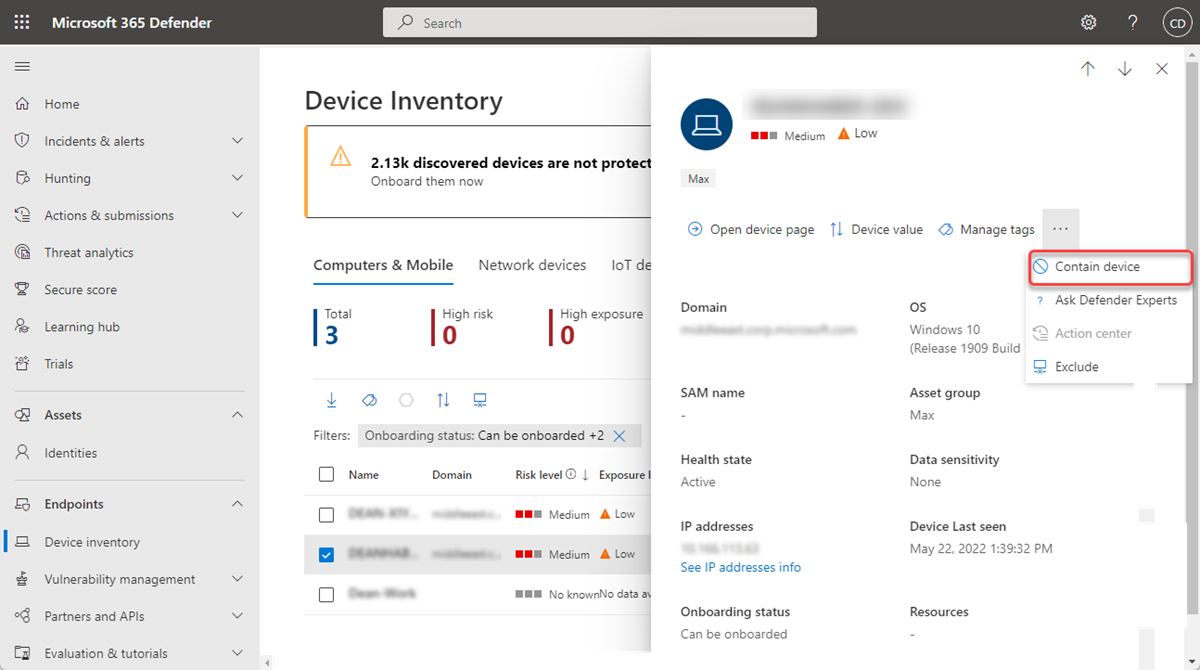
MDE contain device
Image: Microsoft

How to contain compromised Windows devices

To contain a device that is potentially compromised, admins have to go through the following steps:

  1. Go to the ‘Device inventory’ page in the Microsoft 365 Defender portal and select the device to contain.
  2. Select ‘Contain device’ from the actions menu in the device flyout.
  3. On the contain device popup, type a comment, and select ‘Confirm.’

After you contain an unmanaged device, it can take up to 5 minutes for Microsoft Defender for Endpoint onboarded devices to start blocking communications.

If any of the contained devices on the network will change its IP address, all enrolled devices will recognize this and begin blocking communications with the new IP address.

To stop containing a specific device, select it from ‘Device inventory’ or open the device page. Then you need to select ‘Release from containment’ from the action menu to restore the device’s connection to the network.

Source: Sergiu Gatlan
Via: bleepingcomputer
Tags: Microsoft Defender now isolates hackedunmanaged Windows devices
ShareTweet

Get real time update about this post categories directly on your device, subscribe now.

Unsubscribe

Search

No Result
View All Result

Recent News

Absa and Visa Extend Strategic Partnership to Advance Growth and Innovation Across Africa

Absa and Visa Extend Strategic Partnership to Advance Growth and Innovation Across Africa

July 29, 2025
French Telco Orange Hit by Cyber-Attack

French Telco Orange Hit by Cyber-Attack

July 29, 2025
ATC Ghana supports Girls-In-ICT Program

ATC Ghana supports Girls-In-ICT Program

April 25, 2023

About What We Do

itechnewsonline.com

We bring you the best Premium Tech News.

Recent News With Image

Absa and Visa Extend Strategic Partnership to Advance Growth and Innovation Across Africa

Absa and Visa Extend Strategic Partnership to Advance Growth and Innovation Across Africa

July 29, 2025
French Telco Orange Hit by Cyber-Attack

French Telco Orange Hit by Cyber-Attack

July 29, 2025

Recent News

  • Absa and Visa Extend Strategic Partnership to Advance Growth and Innovation Across Africa July 29, 2025
  • French Telco Orange Hit by Cyber-Attack July 29, 2025
  • ATC Ghana supports Girls-In-ICT Program April 25, 2023
  • Vice President Dr. Bawumia inaugurates ICT Hub April 2, 2023
  • Home
  • InfoSec
  • Opinion
  • Africa Tech
  • Data Storage

© Copyright 2026, All Rights Reserved | iTechNewsOnline.Com - Powered by BackUPDataSystems

Welcome Back!

Login to your account below

Forgotten Password?

Retrieve your password

Please enter your username or email address to reset your password.

Log In

Add New Playlist

No Result
View All Result
  • Home
  • Tech
  • Africa Tech
  • InfoSEC
  • Data Science
  • Data Storage
  • Business
  • Opinion

© Copyright 2026, All Rights Reserved | iTechNewsOnline.Com - Powered by BackUPDataSystems

Are you sure want to unlock this post?
Unlock left : 0
Are you sure want to cancel subscription?
Go to mobile version