





Introduction
These days Data Science professionals are expected to have some background and experience in ‘Web Scraping.’ This technique involves gathering relevant data from one or more web pages or websites using a tool like Selenium. To build a web scraper, one needs expertise in Selenium and Python coding, commonly used for this purpose.
Quite a few software vendors provide such web scraping services through their high-end tools. However, a few open-source libraries allow web scraping with 1-2 lines of code. These are perfect for research and educational purposes.
This article will explore a recently introduced web scraping & PyScrappy. It is an excellent Python library for collecting data from e-commerce, social media, images, songs, news, and many more. Follow along the steps in this article to quickly learn web scraping from different websites using PyScrappy.
Introduction to Web Scraping & PyScrappy
Web scraping is an efficient and effective technique to address the need for a dataset when no relevant data is available for model building. Data Scientists often scrape a certain amount of data from different websites using one or a combination of Python libraries like Requests, Beautiful Soup, Selenium, Scrapy, Ixml, etc., to build a dataset for their machine learning/ deep learning models. The web scraping technique solves the scarcity of data and enables these data professionals to exercise greater control in building the dataset by selecting only relevant attributes.
PyScrappy is another open-source and flexible python package for data scraping similar to those mentioned above. It enables users to scrape data from different sources quickly. These are some of the features of PyScrappy:
- Can easily scrape data available on the internet and return the scraped data as a Data Frame
- Requires only a few inputs from the user and performs automatic data scraping
- Is a powerful library as its multiple scrapers work with different websites to scrape data for education and research purposes
PyScrappy offers eight different scrapers for scraping the required data conveniently from various sources. These other scrapers are:
- Ecommerce Scrapper
- Social Media Scrapper
- Food Scrapper
- News Scrapper
- Wikipedia Scrapper
- Stock Scrapper
- Song Scrapper
- Image Scrapper
PyScrappy requires Python >= 3.6. You can find the source code hosted on GitHub. For the latest version, binary installers can be downloaded from PyPi, and the documentation for PyScrappy is available here.
Let us begin our scraping tutorial by installing the PyScrappy library using the pip command.
pip install PyScrappy
This tutorial takes you through four types of web scrapers (Ecommerce, Wikipedia, Social Media, and News scrappers) as provided by PyScrappy. Please note that these web scrapers will work well when you run the code on a local instance of a jupyter notebook instead of a colab notebook or a Kaggle notebook.
After installing the library, first, we have to import the package using the ‘import’ command.
import PyScrappy as ps
Ecommerce Scrapper:
Using this e-commerce scraper, we create a PyScrappy library instance that interacts with the ‘ECommerceScrapper’ class. With this scraper, we can easily scrape data from different E-Commerce websites such as Alibaba, Flipkart, and Snapdeal.
For scraping the e-commerce data, we create an object of this class by using the following command-
obj = ps.ECommerceScrapper()
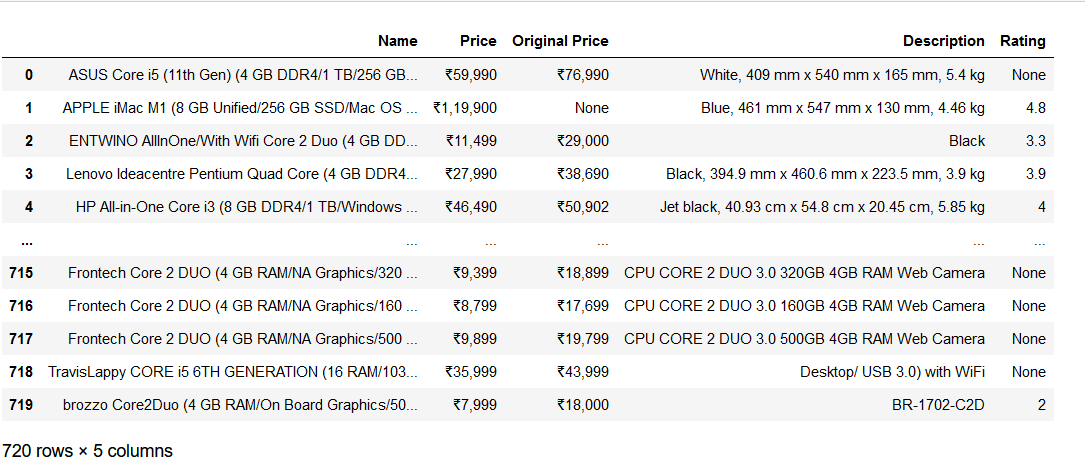
For example, I want to get a new Desktop PC from Flipkart and a nice set of headphones from Snapdeal. So, when I search the keyword ‘PC’ on Flipkart, I get a few hundred results. Filtering options of ‘Popularity,’ ‘Price,’ ‘Featured,’ and ‘Date added’ and the side panel category options (RAM, Storage, Color, CPU, Monitor display size, etc.) on the search results page can help in sorting the results. However, scrolling through multiple pages is quite tedious. So, I can use the Flipkart Ecommerce scraper to help me choose the best product by storing different attributes like name, prices (selling price and original price), description, and rating of all the products. The values of these attributes are stored in a single DataFrame, and there is no need to browse the individual pages of any product. This way, I can see all the results in one single sheet with all the specifications/attributes, which will enable me to make an informed purchase decision.
Let us see how the Pyscrappy Ecommerce scraper works. The syntax for it is –
obj.flipkart_scrapper (‘product_name’, n_pages)
I will search for a Desktop PC by entering ‘product_name’ as ‘PC’ and the number of pages to 18 (i.e., the number of pages that showed up after the keyword search on the website), and I wanted to scrape all the results. It might be different in your case depending on the time and location of the search in the following format. Also, please remember to be nice to the servers when requesting for scraping the data, i.e., do not scrape too much data in a short time.
obj.flipkart_scrapper (‘PC’, 18)
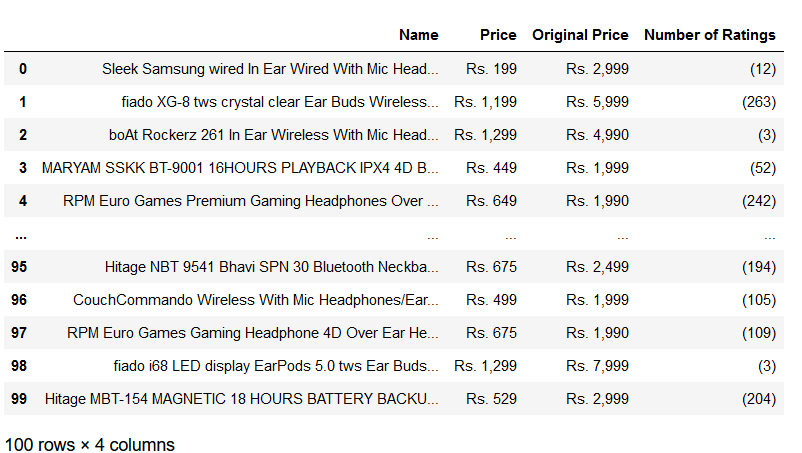
Similarly, for the Headphones search on Snapdeal, I will use the snapdeal_scrapper. It will help to scrape the required data from the Snapdeal website with categories such as Name, Price, Original Price, and Number of Ratings of the desired product. After searching for the keyword ‘headphones,’ there are five search results pages. The syntax for this is
obj.snapdeal_scrapper (‘product_name’, n_pages)
So, I will enter ‘headphones’ as my desired product and the number of pages to ‘5’ in the following format.
obj.snapdeal_scrapper (‘headphones’, 5)
Here is what the scraped data from Flipkart looks like:
Here is what the scraped data from Snapdeal looks like:
2. Social Media Scrapper:
Similar to the previous scraper, the Social Media scraper creates a PyScrappy library instance to interact with the class SocialMediaScrapper. With this scraper, it is possible to scrape data from three social media sites like Instagram, Twitter, and YouTube. For this particular scraper, I will demonstrate the use of the YouTube Scrapper. For scraping social media data, again, we start with creating an object of this class,
obj = ps.SocialMediaScrapper()
YouTube Scrapper:
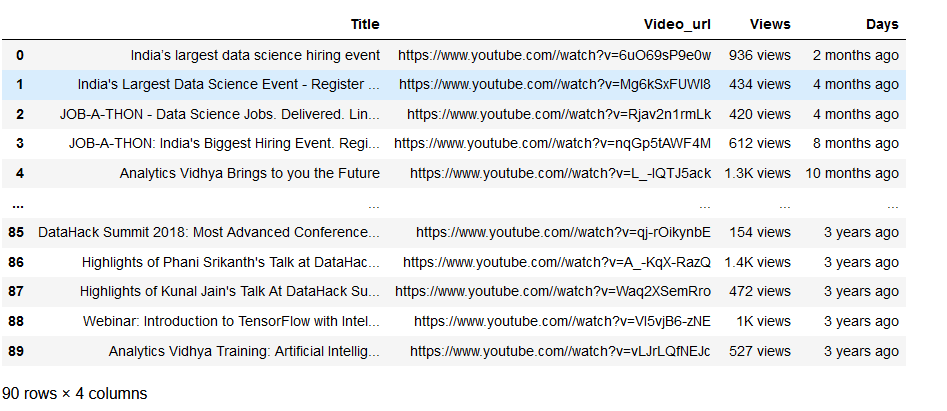
With this YouTube Scraper, we can scrape YouTube data attributes like the ‘Title of the video,’ ‘URL of the Video,’ ‘Number of Views’ the video has got, the number of days after the release.
For example, say I want to get a complete list of videos from Analytics Vidhya’s YouTube channel. So, I will enter the URL of the YouTube channel videos section and the number of pages in the following format.
obj.youtube_scrapper(‘url_of_video_sec’, n_pages)
Note that it is possible to scrape as many pages as you want for the YouTube scrapper. But ensure that the channel URL is valid and ending with ‘videos’ as the URL only from the video section will work. I am only scraping the first two pages for demonstration purposes.
df=obj.youtube_scrapper('https://www.youtube.com/c/Analyticsvidhya/videos', 2)Here is what the DataFrame looks like:
Similarly, you can use the Twitter scraper for a particular Twitter handle and gather the information that helps to scrape data from Twitter-like Name, Twitter Handle, Post Time, Tweet, Reply Count, Retweet Count, and Like Count. Additionally, the Instagram Scraper helps scrape Instagram data like name, posts, followers, following, bio and captions. For correct scraping, it is important that the Instagram account is public. Also, Instagram might request a login after a certain number of runs for continuing the task.
iii) News Scrapper:
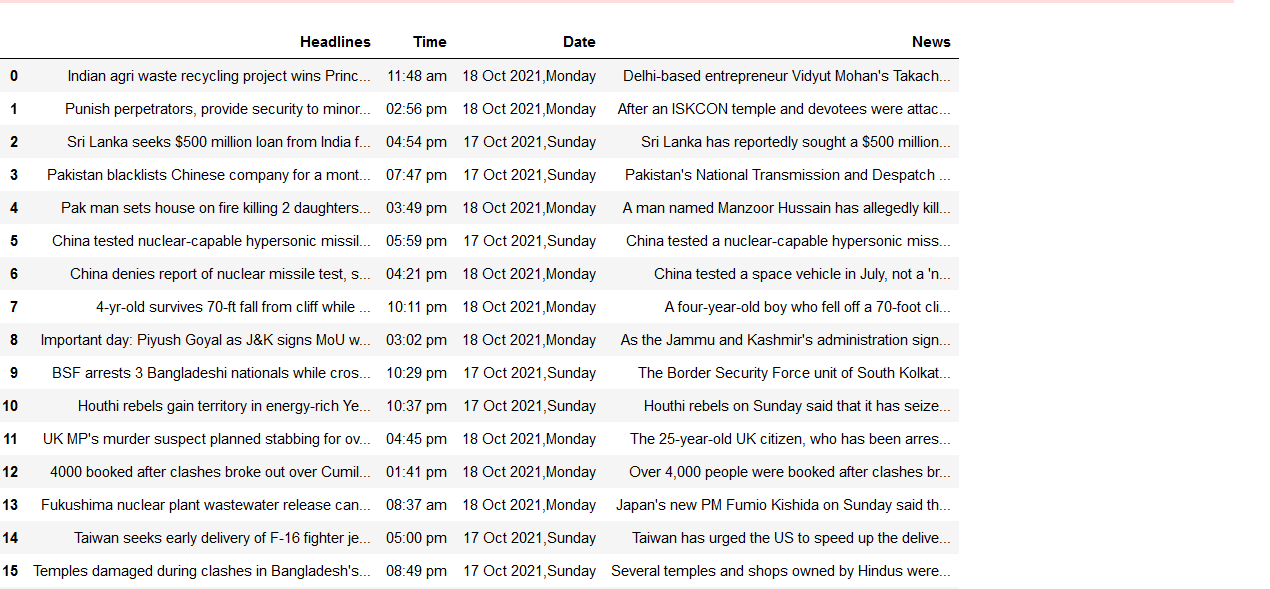
Using the News Scraper, we can create an instance of the PyScrappy library to interact with the class NewsScrapper. It helps in scraping News data, i.e., Headlines, Time, Date, and news, from www.inshorts.com. To scrape the data, we need to enter the genre and number of pages in the following format.
obj.news_scrapper(‘genre’, n_pages)
We can enter any one keyword for genres from accepted values like the world, national, business, sports, politics, technology, entertainment, etc. More information is available on the PyScrappy website.
Let us try scraping the website for ‘world’ news. We use the following command-
obj.news_scrapper(1, 'world')
The scraped data from the website appears as below-
iv) WikipediaScrapper:
This scraper for Wikipedia creates a PyScrappy library instance which interacts with the class WikipediaScrapper and helps in scraping text data from Wikipedia. Here we can scrape data in three formats: paragraph, header, and text. For scraping Wikipedia data, first, we need to create an object of this class.
obj = ps.WikipediaScrapper()
para_scrapper():
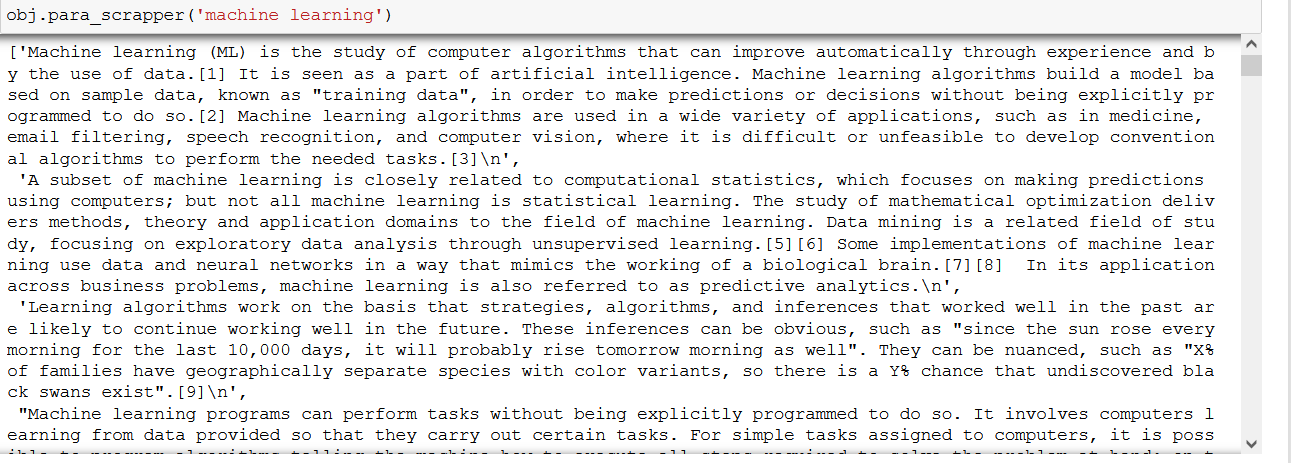
Next, if we want to scrape an entire paragraph, we use the para_scrapper command. We have to enter the keyword for which we intend to scrape the data from Wikipedia in the following format.
obj.para_scrapper('keyword')Let us use the scraper for the keyword’ machine learning’.
obj.para_scrapper('machine learning')Using the above command, we get the following paragraph.
Similarly, we can scrape the header and text of the desired keyword. We only have to ensure that the desired keyword information is available on Wikipedia.
obj.header_scrapper('keyword')obj.header_scrapper('machine learning')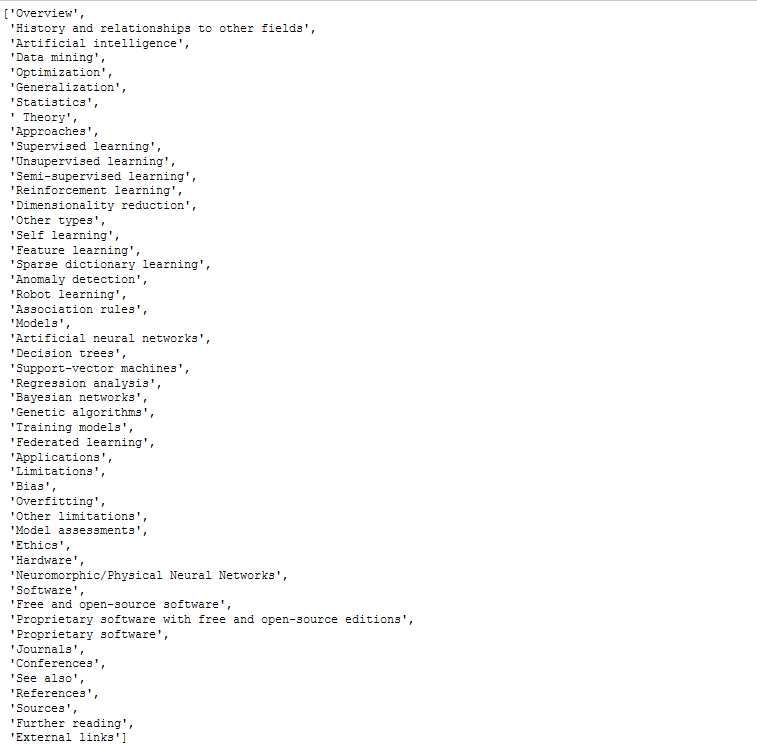
obj.text_scrapper('keyword')obj.text_scrapper('machine learning')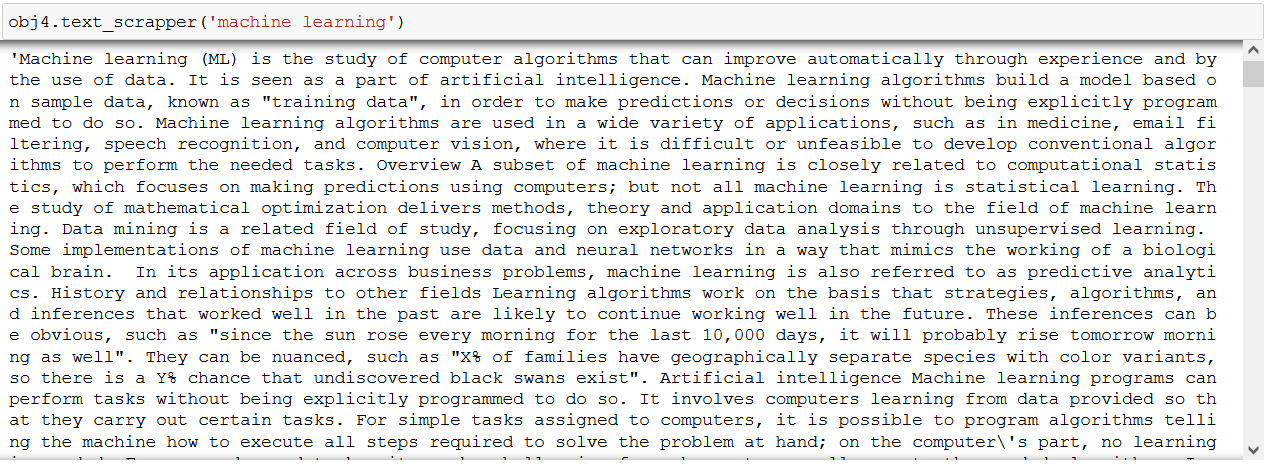
That’s it! Hope you liked my article on web scraping & PyScrappy.
EndNotes
We saw four different scrappers available with the PyScrappy library. It is definitely useful to scrape the required data for practicing and improving EDA/Machine Learning skills. You need a single line of code for data scraping and just two inputs for each scraper that we have tried. Even though this library is relatively new, it appears to be a promising tool in simplifying the data scraping process, thereby reducing the time required to gather the data for model building. So, go ahead and explore this library and the other scrapers not covered in this tutorial.


